Lungs Diagram Generator
Build a lungs diagram with the right and left sides labeled correctly. Compare three right-lung lobes with two left-lung lobes, trace the main bronchi and add a diaphragm reference for your lesson.
SEE ACADRAW IN ACTION
Science drawing, from idea to editable figure
Create a science illustration with AI. Refine drawings, build editable diagrams, and convert images to SVG.
Demos play as you scroll into view. Choose a feature to explore.
Trusted by students & researchers from 480+ universities
A global community spanning 60+ countries and regions, from QS top-ranked universities to leading research institutes
























University logos belong to their respective institutions and are shown solely to illustrate our user community. They do not imply any partnership or endorsement.
Tool overview
Explore the use cases, workflow, and key things to know.
Orient the lungs diagram
Mark patient right and left before assigning any lobe labels.
Separate lobes from segments
Identify the three right-lung lobes and two left-lung lobes without inventing a left middle lobe.
Keep structure and motion distinct
Use the lungs diagram for anatomy; explain inspiration and expiration with separate arrows or panels.
Labeled reference
Labeled lungs diagram: three lobes on the right, two on the left
This lungs diagram is an anterior view: the patient’s right appears on the viewer’s left. Different shades separate the lobes; their boundaries are fissures, not disconnected bags. The bronchial tree is simplified and the heart is omitted to reveal the medial cardiac notch. Alveoli, blood vessels and pleural layers need separate close-up views.
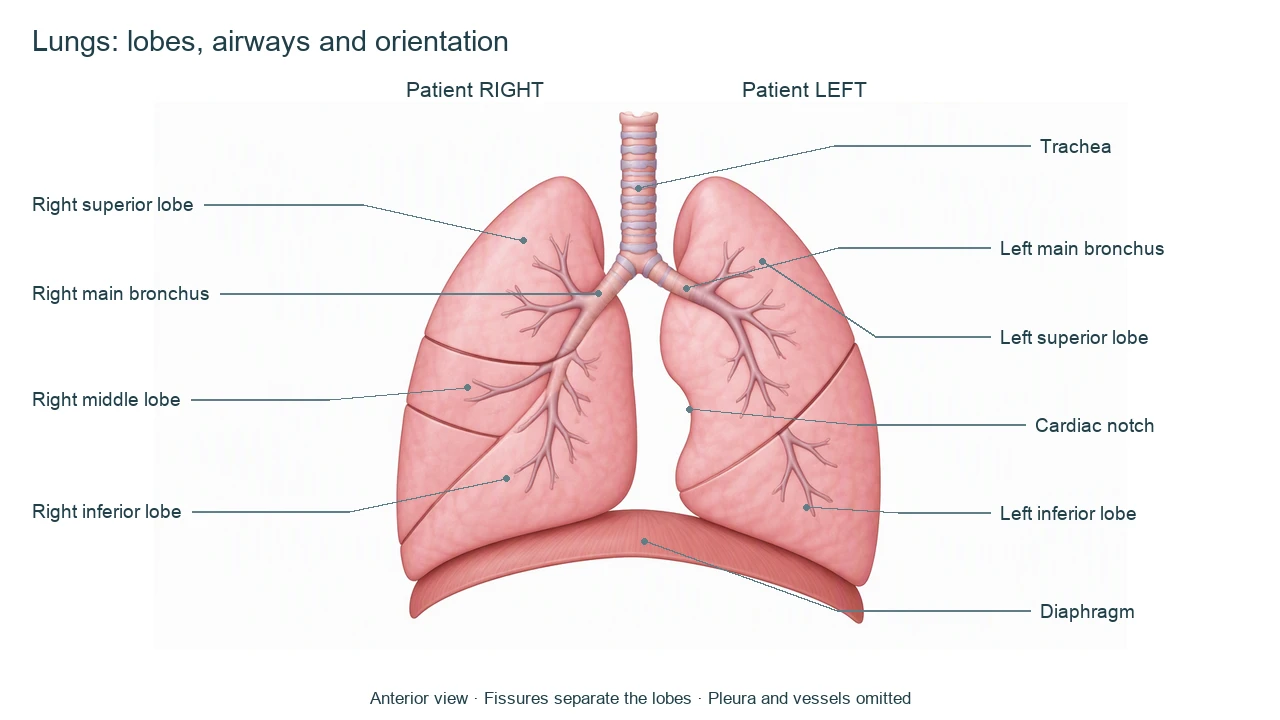
Lungs diagram labels: lobes, airways and nearby structures
Use this label key to plan your diagram. Soft tissues or functions described in the table may require an additional view or layer.
| Label | Position in an anterior view | Role and diagram note |
|---|---|---|
| Trachea | Midline tube above the bronchial split | Conducts air toward the main bronchi. Cartilage rings support the airway. |
| Right main bronchus | Patient right, on the viewer’s left | Typically wider, shorter and more vertical than the left main bronchus. Branches supply the right lung. |
| Left main bronchus | Patient left, on the viewer’s right | Passes toward the left lung and gives rise to its lobar bronchi. |
| Right superior lobe | Upper patient-right lung | One of three right-lung lobes; the horizontal fissure separates it from the middle lobe. |
| Right middle lobe | Between the right horizontal and oblique fissures | A smaller anterior lobe. Its precise outline depends on viewing angle. |
| Right inferior lobe | Below and behind the right oblique fissure | Extends substantially posteriorly, which a flat frontal illustration compresses. |
| Left superior lobe | Upper patient-left lung | Includes the lingula near the cardiac notch; the lingula is not a separate middle lobe. |
| Left inferior lobe | Below and behind the left oblique fissure | The left lung has two lobes, with no normal horizontal fissure dividing off a middle lobe. |
| Cardiac notch | Medial border of the left lung | Indentation accommodating the heart. It is not a hole connecting to an airway. |
| Diaphragm | Beneath the lungs | Primary inspiratory muscle. It is not part of the lung itself. |
Anatomical relationships: OpenStax: The Lungs. On small screens, scroll the table horizontally.
What a lungs diagram reveals, and what needs another view
Read a lungs diagram in layers: external lobes first, conducting airways next, then a separate microscopic explanation of gas exchange.
01
Lobes and fissures
The right lung has superior, middle and inferior lobes separated by horizontal and oblique fissures. The left has superior and inferior lobes divided by an oblique fissure. Fissure positions vary and a frontal image is a projection.
02
Bronchi to gas-exchange surfaces
Main bronchi branch into lobar and segmental bronchi and smaller airways. Alveoli are microscopic gas-exchange structures, not the visible lobes in this lungs diagram.
03
Pleura and breathing mechanics
Visceral pleura covers the lung; parietal pleura lines the thoracic wall. During quiet inspiration the diaphragm contracts and descends. Air does not enter because the lungs actively pull on the bronchi.
Common lungs diagram labeling mistakes
Reversing patient right and left
In an anterior lungs diagram, the three-lobed right lung appears on your left. Put orientation labels above the figure.
Adding a left middle lobe
The lingula belongs to the left superior lobe. It is not a third lobe.
Using one view for every detail
A lobe overview cannot resolve alveoli, pleural layers and pulmonary vessels accurately at the same scale. Use separate insets.
Create your own lungs diagram
Start with the prefilled prompt in the generator above. Reading the reference is free; creating a new AI draft requires an account and available credits. See current pricing.
Choose Science Drawing for an illustrated draft, or Editable Diagram when you need separate shapes and text labels. Check the anatomy in either mode before using the result.
- 1
Set the orientation
Request an anterior lungs diagram, with patient-right and patient-left labels and the correct lobe count.
- 2
Choose the detail level
Name lobes, fissures and main bronchi for an overview. Request a distinct inset if you need alveoli or pleura.
- 3
Review the anatomy
Check fissure boundaries, the cardiac notch and airway branches before using the draft in teaching.
A prompt you can adapt
Create a labeled lungs diagram for an anatomy lesson. Use an anterior view and explicitly mark patient RIGHT on the viewer’s left and patient LEFT on the viewer’s right. Show three right-lung lobes (superior, middle, inferior) separated by horizontal and oblique fissures, and two left-lung lobes (superior, inferior) separated by one oblique fissure. Include trachea, main bronchi, a simplified bronchial tree, the left cardiac notch and a separate diaphragm beneath both lungs. Do not add a left middle lobe. Omit vessels, alveolar detail and pleural layers in this overview. White background, clear leaders, not-to-scale caption.
Use this prompt in the generatorLungs FAQ
How many lobes should a lungs diagram show?
A typical lungs diagram shows three lobes on the right—superior, middle and inferior—and two on the left—superior and inferior. Anatomical variations exist.
Why is the right lung on the left of the picture?
An anterior lungs diagram faces the patient. The patient’s right therefore appears on the viewer’s left; always read the orientation labels.
What separates the lung lobes?
Fissures separate the lobes. The right lung has horizontal and oblique fissures, while the left typically has an oblique fissure.
Is the lingula a left middle lobe?
No. The lingula is part of the left superior lobe near the cardiac notch. It is not a separate lobe.
Where are alveoli in this lungs diagram?
Alveoli lie in the respiratory portion of the airway tree and are microscopic. This organ-level overview does not resolve individual alveoli; use a separate enlarged inset.
How is this different from a respiratory system diagram?
This lungs diagram focuses on organ anatomy: lobes, fissures, main bronchi and orientation. A respiratory system diagram covers the broader air route, including nasal and throat structures.
Can I generate an editable lungs diagram?
Yes. Use Editable Diagram for separate shapes and labels or Science Drawing for an illustrated draft. Generation requires an account and credits. Check anatomical accuracy before using the result.
Sources and editorial notes
- OpenStax, Anatomy and Physiology: The Lungs — factual background for the accompanying explanation.
- OpenStax: The Process of Breathing — additional educational context.
Prepared by the AcaDraw product team. Source and label check: . Independent medical review has not been completed. This material is for education; AI drafts need review against reliable anatomy references before use and are not for diagnosis or treatment.
Turn the reference into your own teaching figure
Choose the structures your lesson needs, create a draft, and review it before sharing.
Read the lung lobes and airways guideFemale reproductive system diagram
Explore the labeled reference and drawing guide.
Nervous system diagram
Explore the labeled reference and drawing guide.
Labeled heart diagram
Explore the labeled reference and drawing guide.
Foot Anatomy diagram
Explore the labeled reference and drawing guide.
Shoulder Anatomy diagram
Explore the labeled reference and drawing guide.
Labeled brain diagram
Explore the labeled reference and drawing guide.
Digestive system diagram
Explore the labeled reference and drawing guide.
Respiratory system diagram
Explore the labeled reference and drawing guide.
Skeletal system diagram
Explore the labeled reference and drawing guide.
Neuron diagram
Explore the labeled reference and drawing guide.
Medical illustration generator
Plan other educational anatomy illustrations.