Brain Diagram Generator
Use this labeled brain diagram to locate the cerebral lobes and major surface landmarks. Compare the lateral view with a brainstem section, then create a focused educational draft.
SEE ACADRAW IN ACTION
Science drawing, from idea to editable figure
Create a science illustration with AI. Refine drawings, build editable diagrams, and convert images to SVG.
Demos play as you scroll into view. Choose a feature to explore.
Trusted by students & researchers from 480+ universities
A global community spanning 60+ countries and regions, from QS top-ranked universities to leading research institutes























University logos belong to their respective institutions and are shown solely to illustrate our user community. They do not imply any partnership or endorsement.
Tool overview
Explore the use cases, workflow, and key things to know.
Views before labels
Choose a lateral view for surface lobes and a section for deeper structures.
Structure and function
Locate each region without reducing complex functions to a single colored patch.
A draft you can review
Generate a focused diagram, then check its view, label endpoints and spelling.
Labeled reference
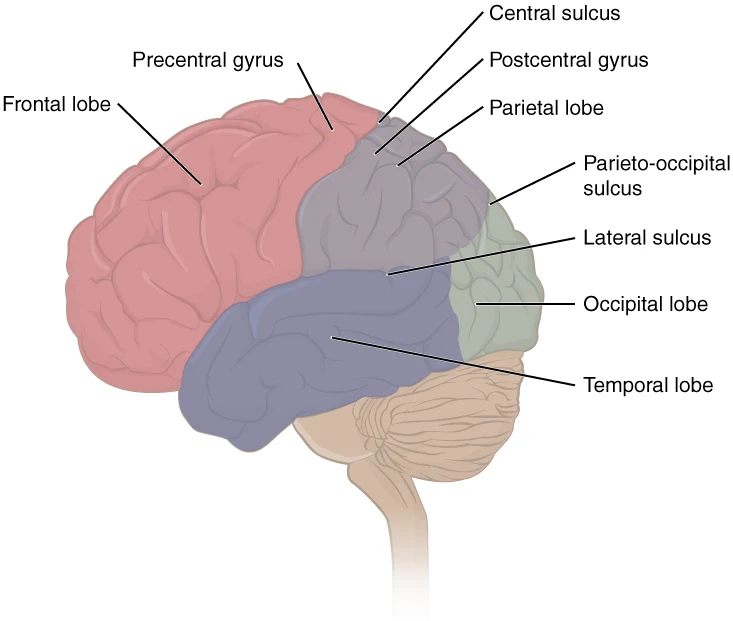
Labeled brain diagram: locate the four surface lobes
This left lateral view shows the outside of one cerebral hemisphere. The frontal lobe is toward the face, on your left; the occipital lobe is at the back, on your right. Internal structures such as the thalamus are not visible in this surface view. The insula lies deep to the lateral sulcus.
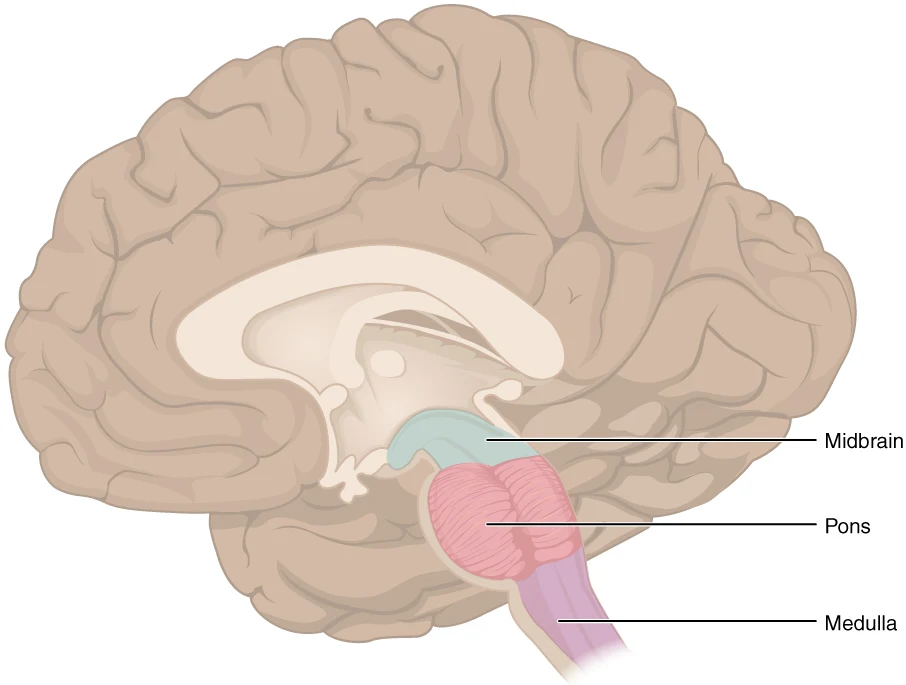
Use a section for the brainstem
A medial section reveals the midbrain, pons, and medulla. These are brainstem regions, not cerebral lobes. Keep this view separate from the lateral cortex reference; it does not label every internal brain structure.
Brain diagram labels: parts, locations and functions
Use this label key alongside the reference. Soft tissues or functions described in the table may require an additional view or layer.
| Structure | Where to find it | Role and diagram note |
|---|---|---|
| Cerebrum and cerebral cortex | Large upper part of the brain; cortex is its outer gray-matter layer | Supports perception, voluntary action and higher cognitive functions through interconnected networks. The cortex is not the whole brain. |
| Frontal lobe | Anterior to the central sulcus | Includes regions involved in voluntary movement, planning and aspects of language. Functions are distributed across networks. |
| Parietal lobe | Behind the central sulcus and above the lateral sulcus | Includes the primary somatosensory cortex and supports sensory integration and spatial processing. |
| Temporal lobe | Below the lateral sulcus | Includes auditory processing regions; medial temporal structures contribute to memory. Those internal structures are not shown in the surface plate. |
| Occipital lobe | Posterior end of the cerebrum | Contains primary visual cortex and other visual processing regions. Do not place it next to the forehead. |
| Central sulcus | Groove between frontal and parietal lobes | Separates the precentral gyrus, which contains primary motor cortex, from the postcentral gyrus, which contains primary somatosensory cortex. |
| Cerebellum | Behind the brainstem, below the posterior cerebrum | Contributes to coordination, balance and motor learning; visible as the smaller folded structure in the lateral plate. It is not a cerebral lobe. |
| Brainstem | Between the diencephalon and spinal cord | Comprises midbrain, pons and medulla. The second reference labels these regions; the spinal cord is not part of the brainstem. |
| Thalamus and hypothalamus | Deep structures of the diencephalon, above the brainstem | The thalamus participates in relay and processing; the hypothalamus contributes to homeostasis and endocrine regulation. Add a separate labeled internal view to show them. |
Anatomical relationships: OpenStax: The central nervous system. On small screens, scroll the table horizontally.
Choose the right view for your brain diagram
A surface drawing, a medial section and a frontal view reveal different relationships. Do not put internal labels on an intact outer surface without explaining a cutaway.
01
Lateral surface
Use the outer side of one hemisphere to teach the frontal, parietal, temporal and occipital lobes, plus the central and lateral sulci. Mark anterior and posterior.
02
Medial or midsagittal section
Use a section to show deeper structures such as the corpus callosum, thalamus and hypothalamus. Include only structures actually visible in the chosen plane.
03
Anterior view
Use a front view to compare the two cerebral hemispheres and their longitudinal fissure. Anatomical right appears on the viewer’s left when facing the person.
Common brain diagram mistakes
Treating a function as one isolated spot
Avoid claims such as “the left brain is logical and the right brain is creative.” Many functions involve networks across both hemispheres.
Putting deep structures on the surface
The hippocampus, thalamus and hypothalamus need a suitable internal view. A label line ending on the outer cortex misrepresents their location.
Confusing the cerebellum and brainstem
The cerebellum lies posterior to the brainstem. The brainstem has three regions; it is not interchangeable with the spinal cord.
Create your own brain diagram
Start with the prefilled prompt in the generator above. Reading the reference is free; creating a new AI draft requires an account and available credits. See current pricing.
Choose Science Drawing for an illustrated draft, or Editable Diagram when you need separate shapes and text labels. Check the anatomy in either mode before using the result.
- 1
Choose scope and view
Start with the four lobes for an introductory worksheet. Request a separate section when you need deeper structures.
- 2
Generate clear label groups
Keep surface regions, internal structures and brainstem parts in distinct panels. Use a short legend rather than dense functional claims.
- 3
Check anatomy and export
Verify orientation, sulci and every leader-line endpoint. Correct the draft against reliable references before sharing or exporting.
A prompt you can adapt
Create a clean educational diagram of the human brain with two separate labeled panels on a white background. Panel A: left lateral surface, anterior to the left, showing frontal, parietal, temporal and occipital lobes, central sulcus, lateral sulcus, cerebellum and the brainstem outline. Panel B: a clearly marked medial section labeling midbrain, pons and medulla. Do not place deep structures on the intact surface. Use spaced leader lines and restrained colors. Avoid disease findings and simplistic left-brain/right-brain personality claims. In Editable Diagram mode, keep text labels and shapes separate for manual review.
Use this prompt in the generatorBrain FAQ
What are the main parts of the brain?
A useful adult-brain overview distinguishes the cerebrum, diencephalon, brainstem and cerebellum. The cerebral cortex is the outer gray-matter layer of the cerebrum; it is not a synonym for the entire brain.
What are the four lobes in a lateral brain diagram?
The frontal, parietal, temporal and occipital lobes are the four lobes commonly shown on the outer lateral surface. The insula is hidden deep to the lateral sulcus, so a complete anatomical classification needs more detail than four colored surface regions.
What is the difference between the cerebrum and cerebellum?
The cerebrum forms the large paired cerebral hemispheres. The cerebellum is a separate structure behind the brainstem that contributes to coordination, balance and motor learning.
Can I see the thalamus in the outer brain view?
Not on the intact lateral surface. Use an appropriate section or cutaway to show the thalamus and other deep structures, and state which view the diagram uses.
How do I make a blank brain diagram for labeling practice?
Create and check your own labeled draft, duplicate it, and remove the names from the copy. Keep numbered pointers and a separate answer key. Retain attribution when reusing the OpenStax reference.
Is the brain diagram generator free?
The labeled reference is free to read. Creating a new AI draft requires signing in and available credits. Choose Science Drawing for an illustrated draft or Editable Diagram for separate shapes and labels, then review the anatomy before use.
Sources and editorial notes
- OpenStax, Anatomy and Physiology: The central nervous system — primary anatomy reference and illustration source.
- NINDS: Brain Basics — Know Your Brain — additional educational context.
Prepared by the AcaDraw product team. Source and label check: . Independent medical review has not been completed. This material is for education; AI drafts need review against reliable anatomy references before use and are not for diagnosis or treatment.
Turn the reference into your own teaching figure
Choose the structures your lesson needs, create a draft, and review it before sharing.
Read the step-by-step tutorialLabeled heart diagram
Explore the labeled reference and drawing guide.
Foot Anatomy diagram
Explore the labeled reference and drawing guide.
Shoulder Anatomy diagram
Explore the labeled reference and drawing guide.
Digestive system diagram
Explore the labeled reference and drawing guide.
Medical illustration generator
Plan other educational anatomy illustrations.