RAG Architecture Diagram Generator
Use the RAG architecture diagram generator to separate document indexing from query-time retrieval. Map chunks, embeddings, retrieval, context assembly and answer generation without hiding the source trail.
SEE ACADRAW IN ACTION
Science drawing, from idea to editable figure
Create a science illustration with AI. Refine drawings, build editable diagrams, and convert images to SVG.
Demos play as you scroll into view. Choose a feature to explore.
Trusted by students & researchers from 480+ universities
A global community spanning 60+ countries and regions, from QS top-ranked universities to leading research institutes























University logos belong to their respective institutions and are shown solely to illustrate our user community. They do not imply any partnership or endorsement.
Tool overview
Explore the use cases, workflow, and key things to know.
Two distinct pipelines
Separate document preparation from runtime retrieval.
Traceable context
Keep the original question and source identifiers visible.
Explicit boundaries
Place filtering and ranking at the right stage.
Concept reference
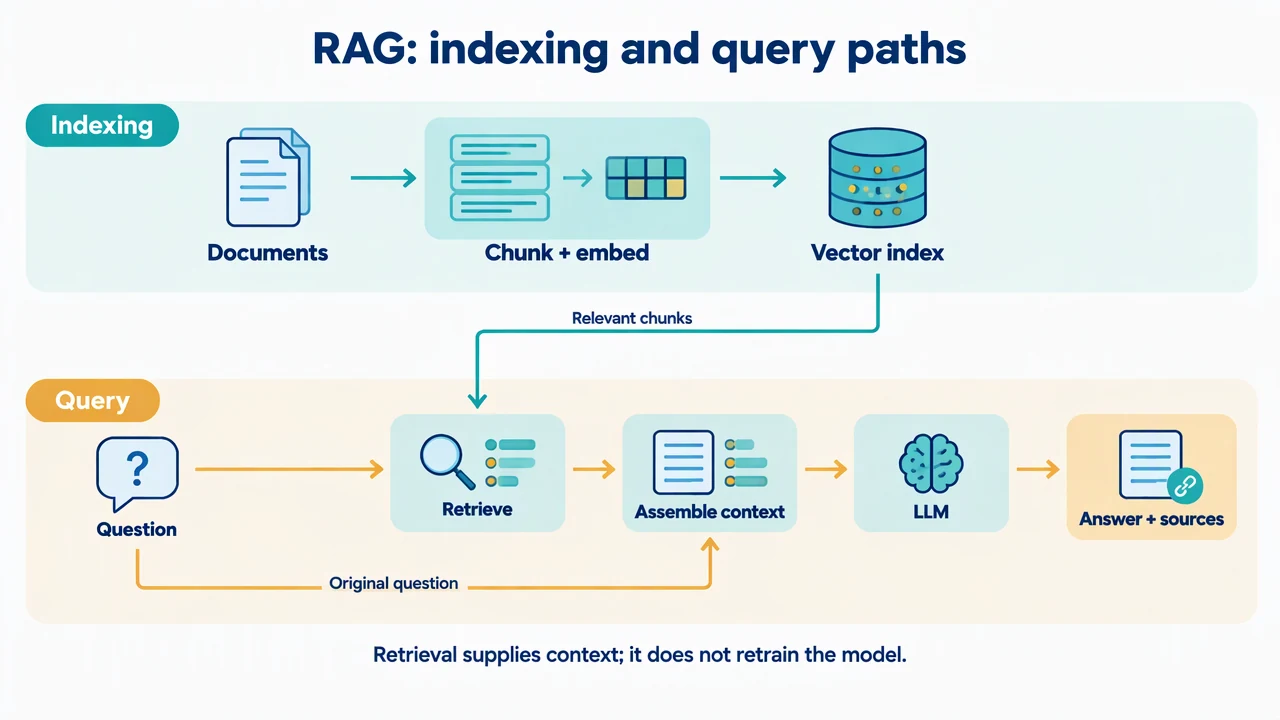
RAG architecture: indexing and query paths
Two lanes distinguish an indexing pipeline from a runtime request. The retriever reads the index, and retrieved context joins the user question before the language model generates an answer.
RAG Architecture Diagram Generator: reference key
Use the reference and definitions together. On a small screen, scroll the table horizontally.
| Element | Meaning | Review check |
|---|---|---|
| Ingestion | Preparing source material for retrieval | Track document versions and access permissions. |
| Chunk | A retrieval unit cut from a source | Retain its source location and enough surrounding context. |
| Embedding | A representation used for similarity retrieval | Do not confuse vector similarity with factual correctness. |
| Retrieval | Selecting potentially relevant material | Name filters, ranking or reranking when included. |
| Context assembly | Combining the question and retrieved evidence | Keep source references and prompt boundaries clear. |
| Answer generation | Producing a response from the supplied context | Citations help trace claims but still require checking. |
RAG Architecture Diagram Generator: plan the visual
Use the RAG architecture diagram generator to separate document indexing from query-time retrieval. Map chunks, embeddings, retrieval, context assembly and answer generation without hiding the source trail.
Separate indexing from answering
Documents may be processed before a user asks a question. The RAG architecture diagram generator should show that preparation as a separate path rather than making every request rebuild the entire index. Label the point where runtime retrieval reads stored representations.
Keep the question and sources visible
Retrieved chunks supplement the original question; they do not replace it. Show how both enter the prompt and how source identifiers survive into the response. A diagram that ends with an unlabeled answer box hides the evidence trail that readers need to inspect.
Add controls where they act
Access checks, metadata filters and reranking belong at specific points in the pipeline. Draw them when they matter to the system, and distinguish them from the base language model. Retrieval can improve grounding, but a diagram cannot guarantee correct answers or enforce permissions.
Common mistakes to avoid
Calling retrieval model training
Supplying context at request time does not by itself update model weights. Keep fine-tuning and retrieval as distinct operations.
Equating similarity with truth
A relevant-looking chunk can be stale, incorrect or inaccessible to the user. Show source/version handling and retrieval filters.
Omitting empty retrieval
Describe how the application responds when no adequate source is found instead of drawing a guaranteed success path only.
RAG Architecture Diagram Generator: from brief to draft
Reading the reference is free. Generating a new draft requires an account and available credits. See current pricing.
Choose Science Drawing for an illustrated draft, or Editable Diagram for separate shapes and labels. Review all definitions, labels and connections before sharing.
- 1
Describe both pipelines
List ingestion steps and query-time components, with source and permission handling.
- 2
Generate the system view
Use the RAG architecture diagram generator to connect retrieval and context assembly explicitly.
- 3
Trace one question
Verify source identifiers, empty-result behavior and each component boundary.
Example brief for the rag architecture diagram generator
Original educational illustration on white, 1280x720 landscape, crisp vector-like editorial style, navy readable English labels, teal and amber accents, generous whitespace. Render all shapes, labels and arrows directly in the image. No third-party artwork, brand, logo, screenshot or measured result. Title 'RAG: indexing and query paths'. Two horizontal lanes. Top 'Indexing': 'Documents' -> 'Chunk + embed' -> 'Vector index'. Bottom 'Query': 'Question' -> 'Retrieve' -> 'Assemble context' -> 'LLM' -> 'Answer + sources'. A vertical connector from Vector index down to Retrieve labeled 'Relevant chunks'. Also route Question to Assemble context with a clearly labeled thin bypass 'Original question'. No extra arrows to training weights. Footer 'Retrieval supplies context; it does not retrain the model'.
Use this prompt in the generatorRAG Architecture Diagram Generator: common questions
What does the RAG architecture diagram generator create?
It drafts the components and context flow of a retrieval-augmented generation system from your description.
Does this page build or host a RAG system?
No. It creates a visual draft and does not ingest documents into a running retrieval service.
Is RAG the same as fine-tuning?
No. RAG retrieves external information for context; fine-tuning changes model parameters through training.
Should I include reranking?
Include it if the system uses it, and show where candidate results are rescored before context assembly.
Sources and editorial notes
Prepared by the AcaDraw product team. Source and diagram check: . This is a simplified educational model; independent expert review has not been completed. AI-generated drafts need checking against reliable references.
Explore the rag architecture diagram guide
Two lanes distinguish an indexing pipeline from a runtime request. The retriever reads the index, and retrieved context joins the user question before the language model generates an answer.
RAG Architecture: Indexing, Retrieval, and Grounded Answers