LLM Architecture Diagram Generator
Use the LLM architecture diagram generator to explain tokenization, embeddings, attention blocks and next-token decoding. Define the model family and level of detail before creating a labeled architecture draft.
SEE ACADRAW IN ACTION
Science drawing, from idea to editable figure
Create a science illustration with AI. Refine drawings, build editable diagrams, and convert images to SVG.
Demos play as you scroll into view. Choose a feature to explore.
Trusted by students & researchers from 480+ universities
A global community spanning 60+ countries and regions, from QS top-ranked universities to leading research institutes
























University logos belong to their respective institutions and are shown solely to illustrate our user community. They do not imply any partnership or endorsement.
Tool overview
Explore the use cases, workflow, and key things to know.
Model internals
Organize the neural computation rather than a deployment inventory.
Explicit abstraction
Choose which repeated blocks and paths need to be shown.
Readable decoding
Separate vocabulary scores from next-token selection.
Concept reference
Decoder-only language model: a conceptual forward pass
A left-to-right teaching model separates tokenization and embeddings from repeated decoder blocks, vocabulary scores and next-token selection. It is a conceptual inference view, not a named model specification.
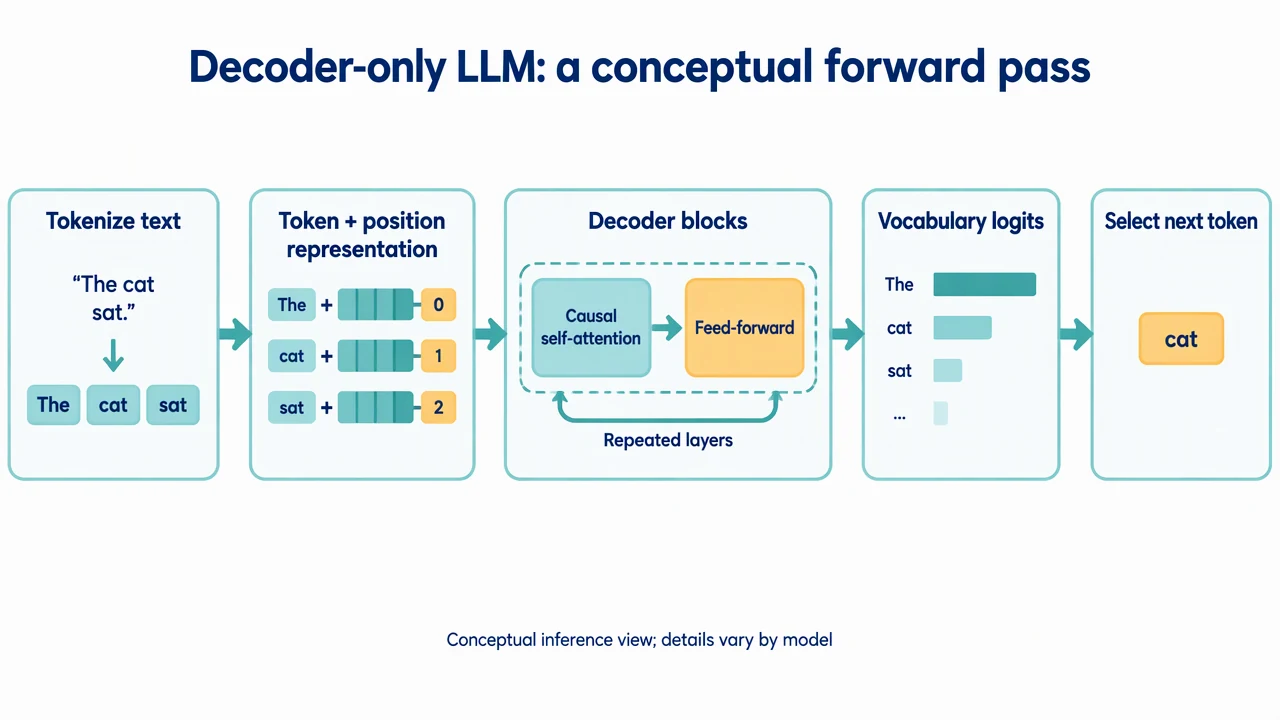
LLM Architecture Diagram Generator: reference key
Use the reference and definitions together. On a small screen, scroll the table horizontally.
| Element | Meaning | Review check |
|---|---|---|
| Tokenization | Converting text into model tokens | Keep token boundaries distinct from ordinary word boundaries. |
| Embedding | A learned representation of a token | State how position information is incorporated at this level. |
| Causal attention | Attention limited by the autoregressive mask | Do not draw future-token access in the inference explanation. |
| Decoder block | A repeated computation stage | Specify if residual paths and normalization are omitted. |
| Logits | Unnormalized scores over a vocabulary | Distinguish scores from selected text. |
| Decoding | A policy for choosing the next token | Name sampling or another policy without claiming determinism. |
LLM Architecture Diagram Generator: plan the visual
Use the LLM architecture diagram generator to explain tokenization, embeddings, attention blocks and next-token decoding. Define the model family and level of detail before creating a labeled architecture draft.
Choose a model family
Decoder-only, encoder-only and encoder-decoder models do not share the same top-level structure. Use the LLM architecture diagram generator with a stated family and purpose. An inference explanation should not quietly import a cross-attention branch from a different architecture.
Separate computation from serving
Token embeddings, attention and feed-forward transformations belong inside the model. A web API, queue and retrieval store belong to a serving or application view. Keep these on separate levels so the drawing answers one question rather than mixing neural operations with deployment boxes.
Label the autoregressive step
The model produces vocabulary scores and the decoding policy selects a next token. Explain that generation repeats this step with updated context. A conceptual diagram can omit caches and normalization details if the caption says so; it should not invent a model-specific layer count.
Common mistakes to avoid
Using the original Transformer as every LLM
Some models omit an encoder or change position encoding, attention and normalization. Choose the intended architecture instead of copying an all-purpose block list.
Calling logits generated words
Vocabulary scores are followed by a selection policy. Show this boundary explicitly.
Claiming speed from a clean layout
A block diagram does not establish latency, memory use or quality. Measurements require a specified implementation and workload.
LLM Architecture Diagram Generator: from brief to draft
Reading the reference is free. Generating a new draft requires an account and available credits. See current pricing.
Choose Science Drawing for an illustrated draft, or Editable Diagram for separate shapes and labels. Review all definitions, labels and connections before sharing.
- 1
Define the model view
Supply the architecture family, input/output and whether the figure covers inference or training.
- 2
Generate labeled blocks
Use the LLM architecture diagram generator to show the selected computation stages and connections.
- 3
Check omitted details
Review masks, positional information, residual paths and the limits stated in the caption.
Example brief for the llm architecture diagram generator
Original educational illustration on white, 1280x720 landscape, crisp vector-like editorial style, navy readable English labels, teal and amber accents, generous whitespace. Render all shapes, labels and arrows directly in the image. No third-party artwork, brand, logo, screenshot or measured result. Title 'Decoder-only LLM: a conceptual forward pass'. Five sequential labeled blocks: 'Tokenize text', 'Token + position representation', 'Decoder blocks', 'Vocabulary logits', 'Select next token'. Decoder blocks contain two short labels 'Causal self-attention' and 'Feed-forward'. Mark decoder blocks 'Repeated layers'. Arrows go left to right. Bottom note 'Conceptual inference view; details vary by model'. No fake layer counts, parameter sizes, benchmarks or named model logo.
Use this prompt in the generatorLLM Architecture Diagram Generator: common questions
What does the LLM architecture diagram generator create?
It drafts a conceptual model structure from your description, with labeled components and connections.
Does it infer a proprietary model architecture?
No. Supply verified details for a named model; the tool does not discover its hidden design.
Can I show training instead of inference?
Yes. State the objective and where loss and parameter updates belong, rather than reusing an inference-only layout.
How is this different from a RAG architecture diagram?
This page focuses on computation inside a language model. A RAG diagram focuses on retrieving and supplying external context around a model.
Sources and editorial notes
Prepared by the AcaDraw product team. Source and diagram check: . This is a simplified educational model; independent expert review has not been completed. AI-generated drafts need checking against reliable references.
Explore the llm architecture diagram guide
A left-to-right teaching model separates tokenization and embeddings from repeated decoder blocks, vocabulary scores and next-token selection. It is a conceptual inference view, not a named model specification.
LLM Architecture: Tokens, Attention, and Decoding