Particle Diagram Generator
Use the particle diagram generator to illustrate elements, compounds, mixtures and states of matter. Define a color key and particle counts so the drawing communicates composition and spacing clearly.
SEE ACADRAW IN ACTION
Science drawing, from idea to editable figure
Create a science illustration with AI. Refine drawings, build editable diagrams, and convert images to SVG.
Demos play as you scroll into view. Choose a feature to explore.
Trusted by students & researchers from 480+ universities
A global community spanning 60+ countries and regions, from QS top-ranked universities to leading research institutes





















University logos belong to their respective institutions and are shown solely to illustrate our user community. They do not imply any partnership or endorsement.
Tool overview
Explore the use cases, workflow, and key things to know.
Choose the learning objective
State whether the image compares composition, bonding, phase or a reaction.
Create the labeled panels
Use the particle diagram generator with explicit particle identities and panel instructions.
Verify every symbol
Count atoms, inspect bonds and check consistency with the key before sharing.
Concept reference
Particle diagrams: a consistent symbol key
Three boxes compare a monatomic element, a molecular compound and a mixture. A shared key defines the two atom types; bonding and composition carry meaning rather than color alone.
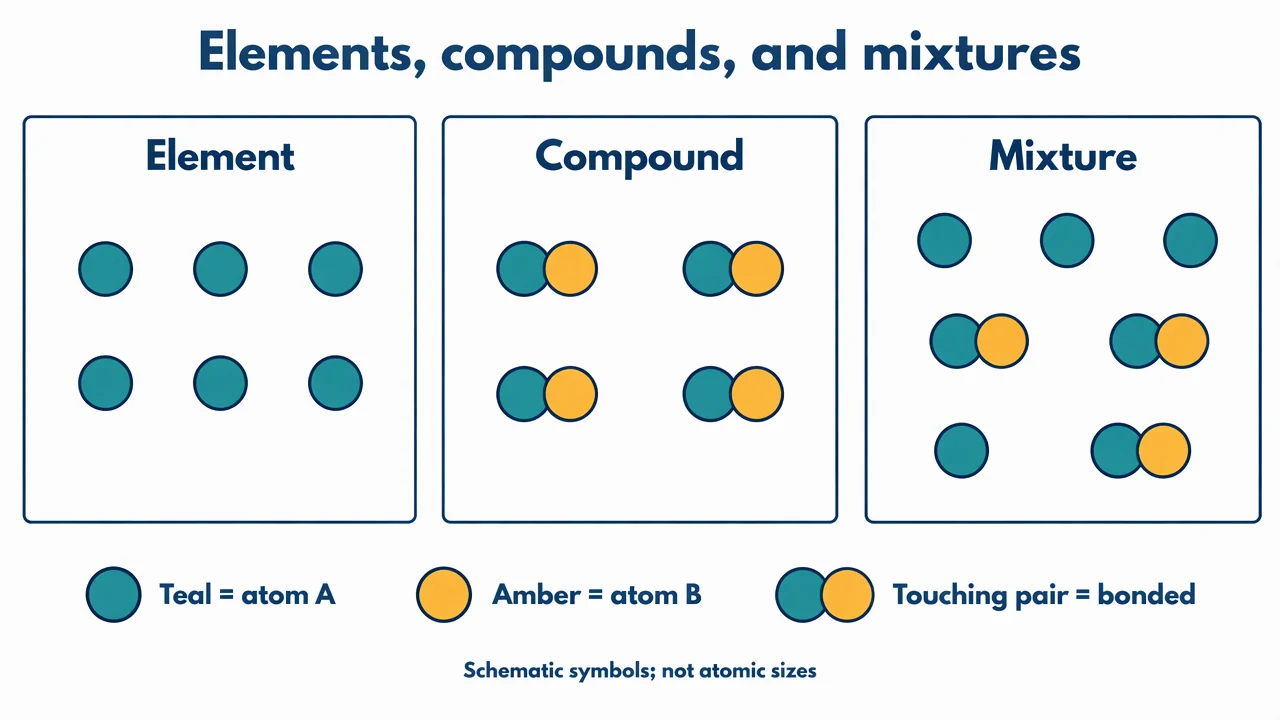
Particle Diagram Generator: reference key
Use the reference and definitions together. On a small screen, scroll the table horizontally.
| Element | Meaning | Review check |
|---|---|---|
| Atom symbol | A circle representing an atom type | Use one color and symbol consistently across panels. |
| Bonded group | Atoms belonging to one molecular unit | Define contact or connecting lines as the bond convention. |
| Element | Material containing one atom type | An element can contain monatomic or molecular particles. |
| Compound | Different atom types chemically combined | Keep the composition of each compound particle consistent. |
| Mixture | More than one substance together | Show different substances without bonding them into one unit. |
| Spacing | A qualitative model of particle arrangement | Do not infer density or temperature numerically from icon spacing. |
Particle Diagram Generator: plan the visual
Use the particle diagram generator to illustrate elements, compounds, mixtures and states of matter. Define a color key and particle counts so the drawing communicates composition and spacing clearly.
Begin with the symbol key
Choose distinct symbols for each atom type before placing particles. A particle diagram generator should preserve those meanings across every panel. Redefining a color between reactants and products makes an otherwise attractive classroom visual chemically ambiguous.
Distinguish molecules from mixtures
Repeated bonded units can represent a pure compound. Several unbonded species in the same container can represent a mixture. Decide which distinction the exercise teaches, and make contact, connecting lines or grouped outlines unambiguous.
Count atoms in reaction models
For a reaction illustration, count each atom type on both sides and check conservation. Use whole particle units in the drawing. AI-generated layouts may omit or add icons, so verify counts manually instead of assuming that visual symmetry proves balance.
Common mistakes to avoid
Using color without a key
Readers cannot identify elements from decorative colors. Add names or symbols and preserve them in the accompanying explanation.
Changing particle identity during a phase change
Melting or boiling changes arrangement and motion, not the chemical identity of the particles in a simple phase model.
Using exact spacing as a measurement
Classroom icons are qualitative. Do not read a numerical concentration or interatomic distance from an arbitrary layout.
Particle Diagram Generator: from brief to draft
Reading the reference is free. Generating a new draft requires an account and available credits. See current pricing.
Choose Science Drawing for an illustrated draft, or Editable Diagram for separate shapes and labels. Review all definitions, labels and connections before sharing.
- 1
Choose the learning objective
State whether the image compares composition, bonding, phase or a reaction.
- 2
Create the labeled panels
Use the particle diagram generator with explicit particle identities and panel instructions.
- 3
Verify every symbol
Count atoms, inspect bonds and check consistency with the key before sharing.
Example brief for the particle diagram generator
Original educational scientific illustration on white, 1280x720 landscape. Crisp vector-like editorial artwork, navy text, teal and amber accents, generous whitespace, large legible English labels. All structures, labels and connecting arrows rendered by the image model. No third-party artwork, logo, photograph, experimental measurement or numerical performance claim. Title 'Elements, compounds, and mixtures'. Three equal outlined containers. Left 'Element': six identical separate teal circles. Middle 'Compound': four identical pairs, each pair one teal circle bonded to one amber circle. Right 'Mixture': three teal single circles plus three teal-amber bonded pairs. Legend 'Teal = atom A', 'Amber = atom B', 'Touching pair = bonded'. Avoid molecular formulas and numeric scales. Footer 'Schematic symbols; not atomic sizes'. Do not draw a statistical data chart.
Use this prompt in the generatorParticle Diagram Generator: common questions
What does the particle diagram generator create?
It drafts qualitative teaching illustrations of atoms, molecules, mixtures and particle arrangement from your description.
Can it balance chemical equations?
Do not rely on the image model for stoichiometric calculation. Supply a checked equation and verify atom counts in the generated image.
Can I show solids, liquids and gases?
Yes. Keep particle identity fixed while changing arrangement and spacing for a simple physical-state comparison.
Are the particles drawn to scale?
No. Symbol sizes and spacing are teaching conventions unless a separate, verified scale is explicitly supplied.
Sources and editorial notes
Prepared by the AcaDraw product team. Source and diagram check: . This is a simplified educational model; independent expert review has not been completed. AI-generated drafts need checking against reliable references.
Explore the particle diagram guide
Three boxes compare a monatomic element, a molecular compound and a mixture. A shared key defines the two atom types; bonding and composition carry meaning rather than color alone.
Particle Diagrams: Elements, Compounds, and Mixtures