Manuscript to Figure Generator
Use the manuscript to figure generator to turn a pasted methods or concept excerpt into a visual draft. Identify entities, steps and relationships, then compare the result with the source text before sharing.
SEE ACADRAW IN ACTION
Science drawing, from idea to editable figure
Create a science illustration with AI. Refine drawings, build editable diagrams, and convert images to SVG.
Demos play as you scroll into view. Choose a feature to explore.
Trusted by students & researchers from 480+ universities
A global community spanning 60+ countries and regions, from QS top-ranked universities to leading research institutes























University logos belong to their respective institutions and are shown solely to illustrate our user community. They do not imply any partnership or endorsement.
Tool overview
Explore the use cases, workflow, and key things to know.
Bounded text input
Begin with a selected method or concept passage.
Source-faithful structure
Preserve qualifiers, entities and step order.
Reviewable draft
Compare labels and relationships against the excerpt.
Concept reference
Manuscript to figure: excerpt, structure and review
Three stages distinguish a written methods excerpt, a structured list of entities and actions, and a simple workflow figure. The reference contains no copied manuscript or fabricated measurement.
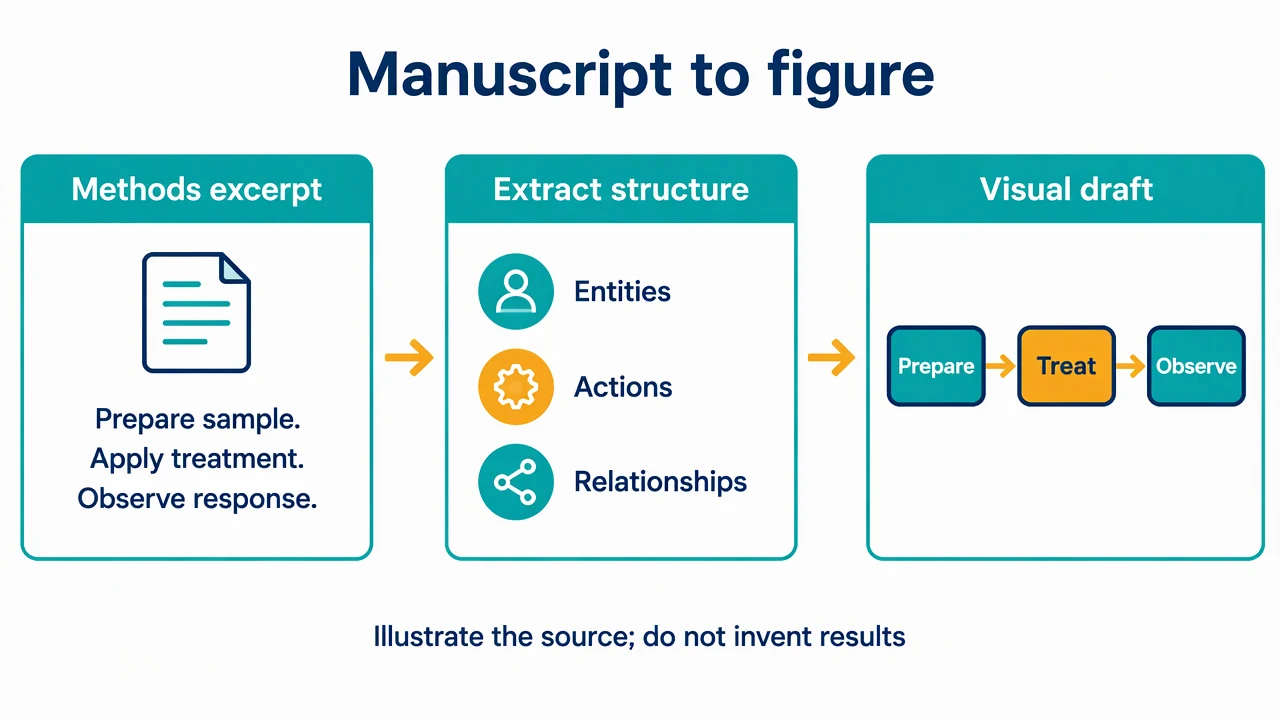
Manuscript to Figure Generator: reference key
Use the reference and definitions together. On a small screen, scroll the table horizontally.
| Element | Meaning | Review check |
|---|---|---|
| Source excerpt | The bounded passage being illustrated | Use text you are authorized to process and record its version. |
| Entity | An object, participant or material named in the text | Keep the source terminology consistent. |
| Action | An operation or event | Preserve order and any conditions that change meaning. |
| Relationship | A connection supported by the passage | Distinguish observation, hypothesis and established mechanism. |
| Visual brief | The structured instructions supplied to the generator | Name what the figure should show and what it omits. |
| Review | Comparison between the draft and source | Check labels, arrows and claims one by one. |
Manuscript to Figure Generator: plan the visual
Use the manuscript to figure generator to turn a pasted methods or concept excerpt into a visual draft. Identify entities, steps and relationships, then compare the result with the source text before sharing.
Select one passage with a purpose
Start with a method sequence, mechanism paragraph or conceptual explanation rather than an entire paper. The manuscript to figure generator works from the text and instructions you provide. Tell it whether the visual should explain operations, spatial relationships or a hypothesis.
Extract structure before decoration
List the named entities, actions and conditions. Keep qualifiers such as proposed or under the tested condition when they affect interpretation. Do not convert an association into a causal arrow just because a flow layout looks cleaner.
Compare every visual claim with the text
Use the source excerpt as a review checklist after generation. The visual should not add a sample type, treatment, endpoint or numerical result absent from the passage. Use existing Science Drawing for illustration, or Editable Diagram with pasted text or supported text/Markdown files for separate shapes and labels.
Common mistakes to avoid
Promising automatic interpretation of the entire paper
This workflow starts with a selected excerpt. Extract relevant text from a PDF yourself; this page does not add a PDF-reading pipeline.
Turning a hypothesis into a confirmed mechanism
Preserve the status of each relationship in labels or line styles.
Redrawing results as plausible images
Keep measured results and original images in their own records. This workflow does not generate statistical charts from result tables.
Manuscript to Figure Generator: from brief to draft
Reading the reference is free. Generating a new draft requires an account and available credits. See current pricing.
Choose Science Drawing for an illustrated draft, or Editable Diagram for separate shapes and labels. Review all definitions, labels and connections before sharing.
- 1
Prepare a short excerpt
Select an authorized passage and state the intended figure question.
- 2
Draft the concept or method
Use the manuscript to figure generator with explicit entities, steps and relationship labels.
- 3
Review against the source
Remove unsupported details and add a caption stating scope and assumptions.
Example brief for the manuscript to figure generator
Original educational illustration on white, 1280x720 landscape, crisp vector-like editorial style, navy readable English labels, teal and amber accents, generous whitespace. Render all shapes, labels and arrows directly in the image. No third-party artwork, brand, logo, screenshot or measured result. Title 'Manuscript to figure'. Three panels left to right: 'Methods excerpt' with short generic text 'Prepare sample. Apply treatment. Observe response.'; 'Extract structure' with three bullet labels 'Entities', 'Actions', 'Relationships'; 'Visual draft' containing three connected labeled boxes 'Prepare' -> 'Treat' -> 'Observe'. Between panels simple right arrows. Footer 'Illustrate the source; do not invent results'. No PDF upload UI, statistics, experimental images or copied paper text.
Use this prompt in the generatorManuscript to Figure Generator: common questions
What does the manuscript to figure generator create?
It drafts a concept, mechanism or method visual from pasted text and your instructions.
Can I upload a PDF directly on this page?
No. Extract and paste the relevant text. Editable Diagram also accepts the existing text and Markdown input workflow.
Will it create charts from result tables?
No. This page focuses on qualitative structure and method explanation rather than data-table visualization.
How do I keep the meaning faithful?
Keep the excerpt beside the draft and compare each entity, label, condition and connection with the source.
Sources and editorial notes
Prepared by the AcaDraw product team. Source and diagram check: . This is a simplified educational model; independent expert review has not been completed. AI-generated drafts need checking against reliable references.
Explore the manuscript to figure guide
Three stages distinguish a written methods excerpt, a structured list of entities and actions, and a simple workflow figure. The reference contains no copied manuscript or fabricated measurement.
Manuscript to Figure: From Written Methods to Visual Structure