Neural Network Diagram Generator
Use the neural network diagram generator to describe a model architecture before turning it into a visual draft. Specify the layers, connection pattern and input/output roles. A neural network diagram can explain structure and signal direction without displaying training data, fitted weights or performance claims.
SEE ACADRAW IN ACTION
Science drawing, from idea to editable figure
Create a science illustration with AI. Refine drawings, build editable diagrams, and convert images to SVG.
Demos play as you scroll into view. Choose a feature to explore.
Trusted by students & researchers from 480+ universities
A global community spanning 60+ countries and regions, from QS top-ranked universities to leading research institutes
























University logos belong to their respective institutions and are shown solely to illustrate our user community. They do not imply any partnership or endorsement.
Tool overview
Explore the use cases, workflow, and key things to know.
Declare the topology
List the layer widths and the role of every group of nodes.
Audit connections
Check direction, dense connectivity and any deliberate skip or recurrent links.
Separate structure and training
An architecture image does not establish accuracy or generalization.
Concept reference
Neural Network Diagram Generator: a worked example
The neural network diagram shows a small 2–3–1 feedforward topology: two input nodes, three hidden nodes and one output. Six input-to-hidden edges and three hidden-to-output edges are shown. Bias terms, activation functions and training are omitted, so the image is a topology reference rather than a complete mathematical model.
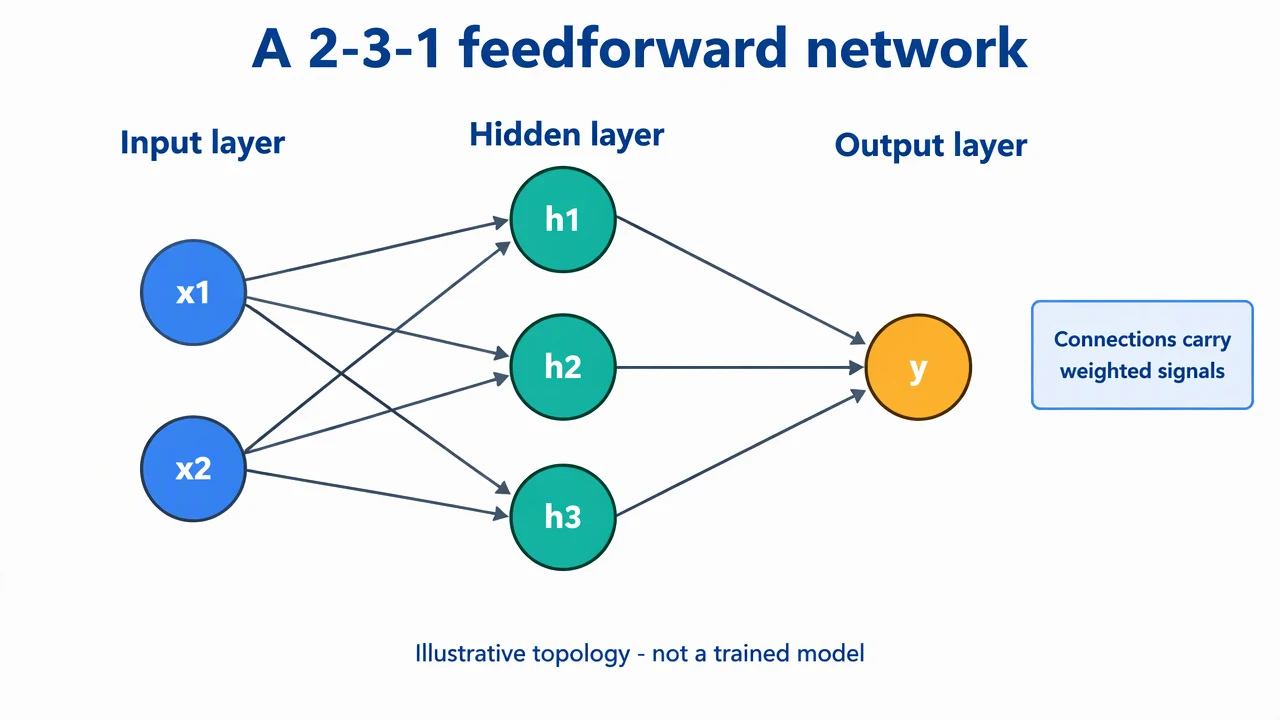
Neural Network Diagram Generator: reference key
Use the reference and definitions together. On a small screen, scroll the table horizontally.
| Element | Meaning | Review check |
|---|---|---|
| Input layer | Features entering the model | Define feature order and whether nodes represent scalars or groups. |
| Hidden layer | Intermediate computational units | State layer size and activation in the accompanying specification. |
| Output layer | The model output representation | Explain whether the output is a score, probability or another quantity. |
| Directed edge | A selected computational dependency | For dense layers, check every intended pair is connected. |
| Bias | An added parameter for a unit | Note when bias terms are omitted from the picture. |
| Architecture note | What the picture leaves out | List activations, tensor dimensions and training details elsewhere. |
Neural Network Diagram Generator: plan the content
Keep a neural network diagram explicit about what a node represents. A circle may stand for one unit, a feature group or an entire tensor; those choices should never be mixed without a key.
Choose the level of detail
Use individual nodes for a small teaching network. Use blocks and tensor shapes for a large model rather than drawing thousands of circles.
Count the connections
A fully connected 2–3–1 neural network diagram has nine weight connections. Biases add parameters even when they are not drawn.
Name the output meaning
A single output node does not by itself imply a probability. The task, output transformation and loss must be specified separately.
Common mistakes in a neural network
Confusing nodes with layers
Three hidden units are not three hidden layers. Label both unit counts and the number of computational stages.
Showing arrows that reverse the forward pass
A basic feedforward neural network diagram has no directed cycles. Depict recurrent or feedback structure only when that architecture actually uses it.
Inventing model results
Do not add accuracy, loss values or fitted weights for a network that has not been trained and evaluated.
Neural Network Diagram Generator: from brief to reviewed draft
Reading the reference is free. Generating a new draft requires an account and available credits. See current pricing.
Choose Science Drawing for an illustrated draft, or Editable Diagram for separate shapes and labels. Review all definitions, labels and connections before sharing.
- 1
Write the architecture specification
Give the neural network diagram generator a layer sequence, widths, connection rules and output role.
- 2
Generate a manageable view
For a small model, draw nodes; for a larger one, request labeled blocks with stated tensor dimensions.
- 3
Compare picture and implementation
Review all edges, omitted biases and activation notes against the real architecture before sharing the neural network diagram.
Example brief for a neural network
Create a 2–3–1 feedforward neural network diagram: two input nodes x1 and x2, three hidden nodes h1 to h3, and one output y. Connect every input to each hidden unit and every hidden unit to the output, with nine directed connections in total. Label the layers and note that biases, activations, trained weights and performance results are not shown.
Use this prompt in the generatorNeural Network Diagram Generator: common questions
What does the neural network diagram generator support?
It drafts a visual architecture from your description. It does not construct, train or evaluate a machine-learning model.
How many connections are in the 2–3–1 example?
There are six input-to-hidden and three hidden-to-output weight connections, for nine total. Bias parameters are omitted from the picture.
Does a neural network diagram show learned weights?
Only if the author supplies verified values and explicitly labels them. The reference example contains no fitted parameters.
Can the neural network diagram generator draw a larger model?
Yes. For a large architecture, describe modules, shapes and dependencies instead of asking for an unreadable node-by-node image.
Is the example biologically realistic?
No. It depicts an artificial feedforward network, not the anatomy or dynamics of biological neurons.
Sources and editorial notes
- Deep Learning: Deep Feedforward Networks
- Google Machine Learning Crash Course: Nodes and hidden layers
Prepared by the AcaDraw product team. Source and diagram check: . This is a simplified educational model; independent expert review has not been completed. AI-generated drafts need checking against reliable references.
Read the neural network guide
Keep a neural network diagram explicit about what a node represents. A circle may stand for one unit, a feature group or an entire tensor; those choices should never be mixed without a key.
Neural Network Diagrams: Layers, Connections, and Architecture