AI Cheat Sheet Maker
Use an AI cheat sheet maker to turn scattered prompting advice into a compact reference. Organize role, task, context, constraints and output format, then add a review checklist so the sheet encourages verification rather than blind trust.
SEE ACADRAW IN ACTION
Science drawing, from idea to editable figure
Create a science illustration with AI. Refine drawings, build editable diagrams, and convert images to SVG.
Demos play as you scroll into view. Choose a feature to explore.
Trusted by students & researchers from 480+ universities
A global community spanning 60+ countries and regions, from QS top-ranked universities to leading research institutes
























University logos belong to their respective institutions and are shown solely to illustrate our user community. They do not imply any partnership or endorsement.
Tool overview
Explore the use cases, workflow, and key things to know.
Keep it task-specific
A useful cheat sheet supports a defined workflow instead of listing every prompting trick.
Separate instructions from context
Tell the model what to do, then provide the information it should use.
Make review visible
Add fact, privacy, citation and quality checks before an output is shared.
Concept reference
AI cheat sheet reference: prompt structure and review
This layout groups prompt elements into a practical sequence: role, task, context, constraints and output format. The final column reminds the reader to check sources, privacy, accuracy and fit for purpose.
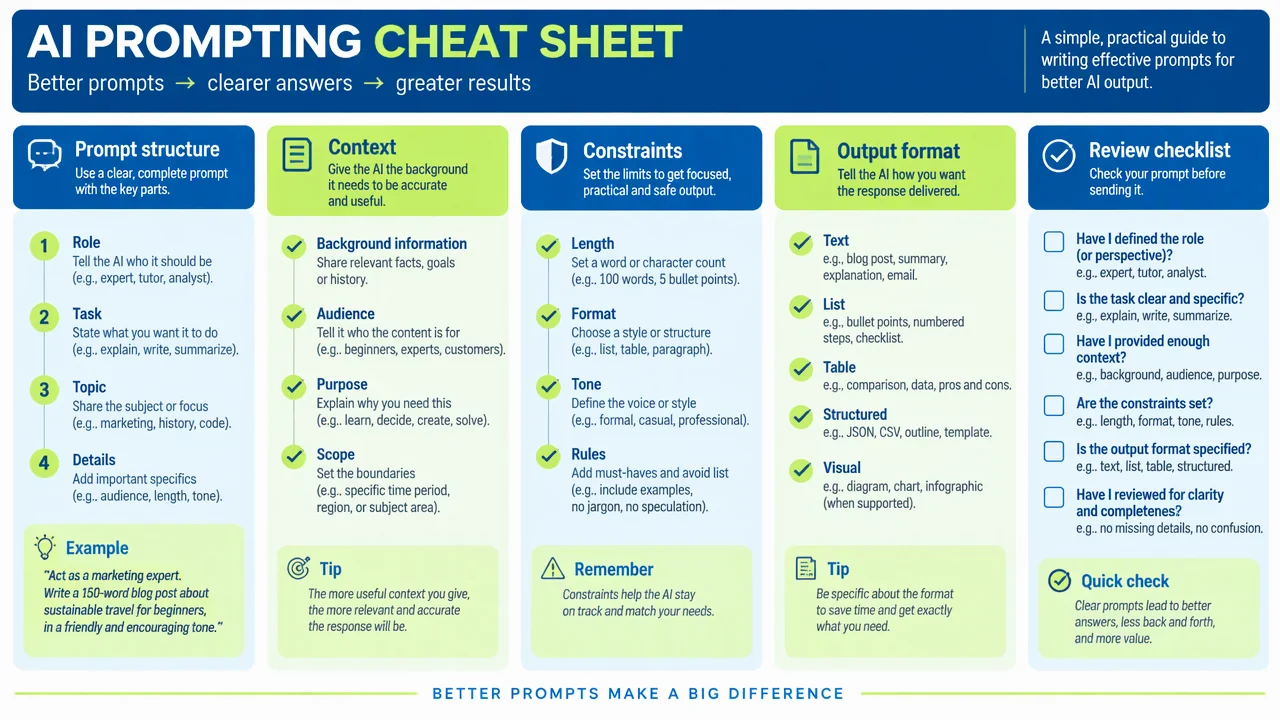
AI cheat sheet section guide
Use the reference and definitions together. On a small screen, scroll the table horizontally.
| Section | What to include | Drawing check |
|---|---|---|
| Role | The perspective or expertise the output should use | Do not imply that a role prompt guarantees expertise or correctness. |
| Task | The action and desired outcome | Use a verb and a concrete deliverable. |
| Context | Definitions, audience, source material and constraints | Include only relevant information and protect sensitive data. |
| Output format | Length, headings, fields, examples or schema | Show the structure you will actually review. |
| Review checklist | Accuracy, sources, privacy, bias and usability checks | Keep review after generation; it is not optional decoration. |
Design a cheat sheet people can actually use
A compact reference works when it reduces decisions at the moment of writing a prompt. Group related choices, show one short example and reserve space for review.
Start with the outcome
The requested deliverable determines which context and format details matter.
Use examples sparingly
One good example can show the level of specificity without becoming a copy-paste template.
Review the output
A cheat sheet should make verification part of the workflow, especially for factual or sensitive tasks.
Common AI cheat sheet mistakes
Trick collections
A long list of hacks is harder to apply than a short task-based structure.
Missing context
A polished instruction without audience, source or constraints can still produce an unusable answer.
No review step
Generated text or visuals need checking before publication, teaching or decision-making.
Create your own ai cheat sheet diagram
Reading the reference is free. Generating a new draft requires an account and available credits. See current pricing.
Choose Science Drawing for an illustrated draft, or Editable Diagram for separate shapes and labels. Review all definitions, labels and connections before sharing.
- 1
Choose the workflow
Decide whether the sheet supports research notes, lesson planning, image prompts or another task.
- 2
Group the instructions
Arrange role, task, context, constraints and output format in the order people use them.
- 3
Test and revise
Try the sheet on a real low-risk task and remove advice that does not improve clarity.
A prompt you can adapt
Create a clean, editable AI prompting cheat sheet for researchers and educators. Include Role, Task, Context, Constraints, Output Format and Review Checklist sections, add one concise example, and emphasize source checking, privacy and human review.
Use this prompt in the generatorAI Cheat Sheet diagram FAQ
What is an AI cheat sheet?
It is a compact reference that organizes repeatable instructions and checks for a specific AI workflow.
What belongs in a prompt?
Usually the task, relevant context, constraints and desired output format; the exact mix depends on the job.
Can a cheat sheet guarantee accurate output?
No. It can make instructions clearer, but facts, sources, privacy and quality still need human review.
Can I make a printable version?
Yes. Choose a compact layout, keep text readable and export after checking the page at its intended size.
Can I edit the generated cheat sheet?
Yes. Editable Diagram mode lets you rearrange sections, change examples and add review items.
Sources and editorial notes
Prepared by the AcaDraw product team. Source and diagram check: . This is a simplified educational model; independent expert review has not been completed. AI-generated drafts need checking against reliable references.
Create a ai cheat sheet diagram for your lesson
Choose the scope, generate a draft, then review labels and connections before sharing.
AI Cheat Sheet Maker: Organize Better Prompts and Better Checks