AI Worksheet Generator
Use an AI worksheet generator to draft a focused learning goal, a visual example, questions and a review checklist. Treat the output as an editable lesson draft and check every fact, instruction and accessibility detail.
SEE ACADRAW IN ACTION
Science drawing, from idea to editable figure
Create a science illustration with AI. Refine drawings, build editable diagrams, and convert images to SVG.
Demos play as you scroll into view. Choose a feature to explore.
Trusted by students & researchers from 480+ universities
A global community spanning 60+ countries and regions, from QS top-ranked universities to leading research institutes
























University logos belong to their respective institutions and are shown solely to illustrate our user community. They do not imply any partnership or endorsement.
Tool overview
Explore the use cases, workflow, and key things to know.
Define the scope
Choose the view, audience and labels before generating.
Keep relationships explicit
Use readable connectors, boundaries or arrows instead of decorative ambiguity.
Review before sharing
Check spelling, endpoints and claims against reliable references.
Concept reference
AI worksheet reference: learning goals, tasks and review
A useful worksheet gives the learner one clear goal, a manageable example, space to reason and a way to check understanding. The visual is a layout concept rather than a finished curriculum or assessment instrument.
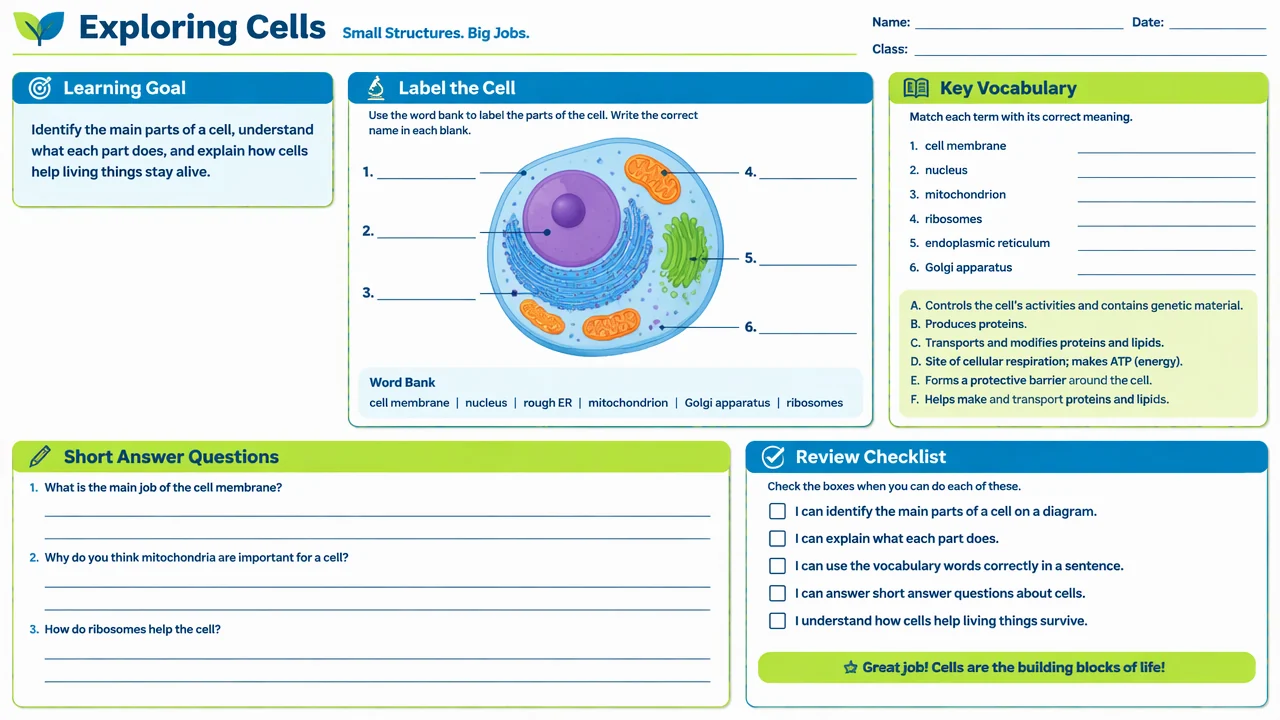
AI worksheet planning key
Use the reference and definitions together. On a small screen, scroll the table horizontally.
| Section | Purpose | Review question |
|---|---|---|
| Learning goal | States what the learner should understand or do. | Can the goal be observed in the completed work? |
| Reference figure | Provides a labeled example or visual context. | Are labels accurate, legible and necessary? |
| Practice task | Asks the learner to apply the concept. | Does the task match the goal and available time? |
| Review checklist | Helps the learner self-check. | Does it reinforce the same criteria used in feedback? |
Turn a generated draft into a usable worksheet
Begin with the learning goal, then choose a reference, task and review criteria that all measure the same concept.
Specific goals reduce noise
A worksheet is easier to use when every prompt serves the target skill.
Blank space is functional
Leave room for labels, reasoning and corrections rather than filling every panel.
Review is editorial
Fact-check content, adapt reading level and verify that instructions are unambiguous.
Common AI worksheet mistakes
Adding activities without a goal
Remove sections that do not support the stated learning outcome.
Trusting generated facts
Check diagrams, definitions, answer keys and citations before distribution.
Crowding the page
Use hierarchy and whitespace so learners can see where to start and respond.
Create your own ai worksheet diagram
Reading the reference is free. Generating a new draft requires an account and available credits. See current pricing.
Choose Science Drawing for an illustrated draft, or Editable Diagram for separate shapes and labels. Review all definitions, labels and connections before sharing.
- 1
Define the outcome
Write one measurable learning goal and the audience level.
- 2
Draft the sections
Add a visual, questions and answer space that directly support the goal.
- 3
Edit and pilot
Fact-check the content, test the layout and revise after a learner tries it.
A prompt you can adapt
Create a printable science worksheet with one learning goal, a small labeled reference figure, four short-answer questions, generous answer space and a review checklist. Use plain language, avoid invented facts, and leave room for a teacher to edit the content.
Use this prompt in the generatorAI Worksheet diagram FAQ
What can an AI worksheet generator create?
It can draft a lesson goal, visual prompt, questions, answer space and review checklist for editing.
Is the generated worksheet ready to print?
Treat it as a draft. Review facts, language, accessibility, answer keys and page breaks first.
Can I include a diagram?
Yes. Add a labeled reference or a blank version, then verify every label.
Can it grade student work?
The generator creates worksheet content; it does not replace teacher judgment or a validated assessment.
How do I make a blank worksheet?
Keep a checked answer key, duplicate the page and remove selected labels or responses.
Sources and editorial notes
Prepared by the AcaDraw product team. Source and diagram check: . This is a simplified educational model; independent expert review has not been completed. AI-generated drafts need checking against reliable references.
Create a ai worksheet diagram for your lesson
Choose the scope, generate a draft, then review labels and connections before sharing.
AI Worksheet Generator: Start with Learning Goals and Review