Western Blot Figure Generator
Use the western blot figure generator to create an educational workflow or a planning layout for a method explanation. Show sample preparation, electrophoresis, transfer and antibody detection. This page supports schematic figures; real Western blot results must come from the original experimental images, not generated bands.
SEE ACADRAW IN ACTION
Science drawing, from idea to editable figure
Create a science illustration with AI. Refine drawings, build editable diagrams, and convert images to SVG.
Demos play as you scroll into view. Choose a feature to explore.
Trusted by students & researchers from 480+ universities
A global community spanning 60+ countries and regions, from QS top-ranked universities to leading research institutes























University logos belong to their respective institutions and are shown solely to illustrate our user community. They do not imply any partnership or endorsement.
Tool overview
Explore the use cases, workflow, and key things to know.
Explain the method
Use process icons to show preparation, separation, transfer and detection.
Keep source evidence intact
Real result figures start from the original experimental image files.
Plan reporting details
List samples, controls, antibodies and processing notes before assembling results.
Concept reference
Western Blot Figure Generator: a worked example
This Western blot figure explains the method at a process level: samples are prepared, proteins are separated, material is transferred to a membrane and antibody-based detection is performed. Equipment icons represent stages only. The reporting note reminds authors to retain source images and relevant context; no experimental blot is depicted.
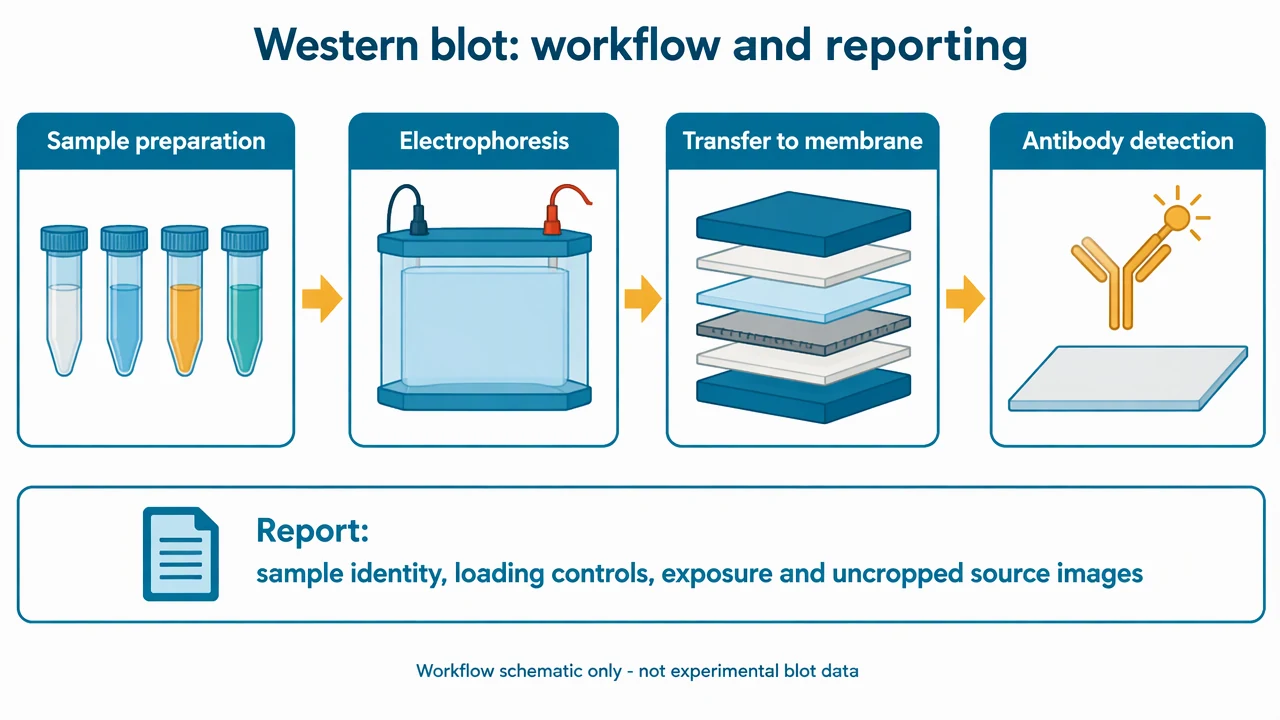
Western Blot Figure Generator: reference key
Use the reference and definitions together. On a small screen, scroll the table horizontally.
| Element | Meaning | Review check |
|---|---|---|
| Sample preparation | Preparing material for the method | Document sample identity and relevant preparation conditions in the actual study record. |
| Electrophoresis | Separating proteins under stated conditions | The equipment icon is not a gel result or evidence of separation quality. |
| Transfer | Moving separated material to a membrane | Describe the membrane and transfer method where relevant. |
| Antibody detection | Target recognition and signal detection | Report antibody identity, controls and detection conditions. |
| Loading and normalization | Context for comparing actual signals | Use appropriate verified controls and a justified analysis method. |
| Source image record | Original experimental evidence | Retain uncropped originals and disclose relevant processing or assembly. |
Western Blot Figure Generator: plan the content
Keep a Western blot figure clear about whether it explains a method or reports actual observations. The workflow reference contains no bands, lanes, molecular-weight ladder or quantitative results.
Separate a method schematic from results
A Western blot figure explaining workflow can use clearly labeled equipment illustrations. A result figure must accurately represent the actual experiment.
Record provenance early
Keep original files, exposure information, lane identities and processing notes together. A publication layout cannot reconstruct missing provenance.
Use labels that support interpretation
For real results, sample identity, target identity and molecular-weight context should be traceable to the study rather than invented for visual completeness.
Common mistakes in a western blot figure
Generating plausible-looking bands
The western blot figure generator is described here for workflow schematics. Generated bands cannot substitute for real experimental observations.
Presenting a crop without context
A cropped result may hide information needed for assessment. Retain the uncropped source and follow the destination journal’s disclosure requirements.
Inventing normalization or loading controls
A control must come from the actual study and support the intended comparison. A decorative control lane is not evidence.
Western Blot Figure Generator: from brief to reviewed draft
Reading the reference is free. Generating a new draft requires an account and available credits. See current pricing.
Choose Science Drawing for an illustrated draft, or Editable Diagram for separate shapes and labels. Review all definitions, labels and connections before sharing.
- 1
Request a schematic scope
Tell the western blot figure generator to draw a workflow, apparatus overview or reporting checklist, explicitly without bands or result lanes.
- 2
Draft stages and annotations
Use labeled process icons for preparation, electrophoresis, transfer and detection.
- 3
Review the Western blot figure
Confirm the image cannot be mistaken for experimental data and keep any real results tied to original source files.
Example brief for a western blot figure
Create a Western blot workflow schematic showing sample preparation, electrophoresis, transfer to a membrane and antibody detection with labeled equipment icons. Include a reporting checklist for sample identity, controls, antibodies, exposure and uncropped source images. Do not draw bands, result lanes, molecular-weight ladders or quantitative signals. Clearly label this as a method schematic, not experimental data.
Use this prompt in the generatorWestern Blot Figure Generator: common questions
What can the western blot figure generator create on this page?
It can draft educational method schematics and planning layouts. This page does not offer generated experimental bands or quantitative blot results.
Can generated bands be used as study results?
No. A result figure must accurately represent real experimental observations and retain the original image provenance.
Does the Western blot figure show a real experiment?
No. The reference consists only of equipment and workflow icons, with no lanes, bands or measured signal.
What should accompany an actual blot result?
Keep sample and antibody identities, appropriate controls, detection conditions, analysis methods and uncropped source images, following the relevant reporting requirements.
Can I use the western blot figure generator for a methods slide?
Yes. Request a clearly labeled schematic of the method, then review its sequence and terminology. Do not present it as an actual blot.
Sources and editorial notes
Prepared by the AcaDraw product team. Source and diagram check: . This is a simplified educational model; independent expert review has not been completed. AI-generated drafts need checking against reliable references.
Read the western blot figure guide
Keep a Western blot figure clear about whether it explains a method or reports actual observations. The workflow reference contains no bands, lanes, molecular-weight ladder or quantitative results.
Western Blot Figures: Workflow, Controls, and Source Images