Textbook Illustration Maker
Use the textbook illustration maker to create original teaching visuals for a defined learning objective. Choose the essential structures, label them clearly and review the illustration against reliable subject references.
SEE ACADRAW IN ACTION
Science drawing, from idea to editable figure
Create a science illustration with AI. Refine drawings, build editable diagrams, and convert images to SVG.
Demos play as you scroll into view. Choose a feature to explore.
Trusted by students & researchers from 480+ universities
A global community spanning 60+ countries and regions, from QS top-ranked universities to leading research institutes





















University logos belong to their respective institutions and are shown solely to illustrate our user community. They do not imply any partnership or endorsement.
Tool overview
Explore the use cases, workflow, and key things to know.
Learning-first layout
Choose structures that support one lesson.
Clear labels
Keep orientation, terminology and leader endpoints consistent.
Original artwork
Generate a new model and verify it against subject references.
Concept reference
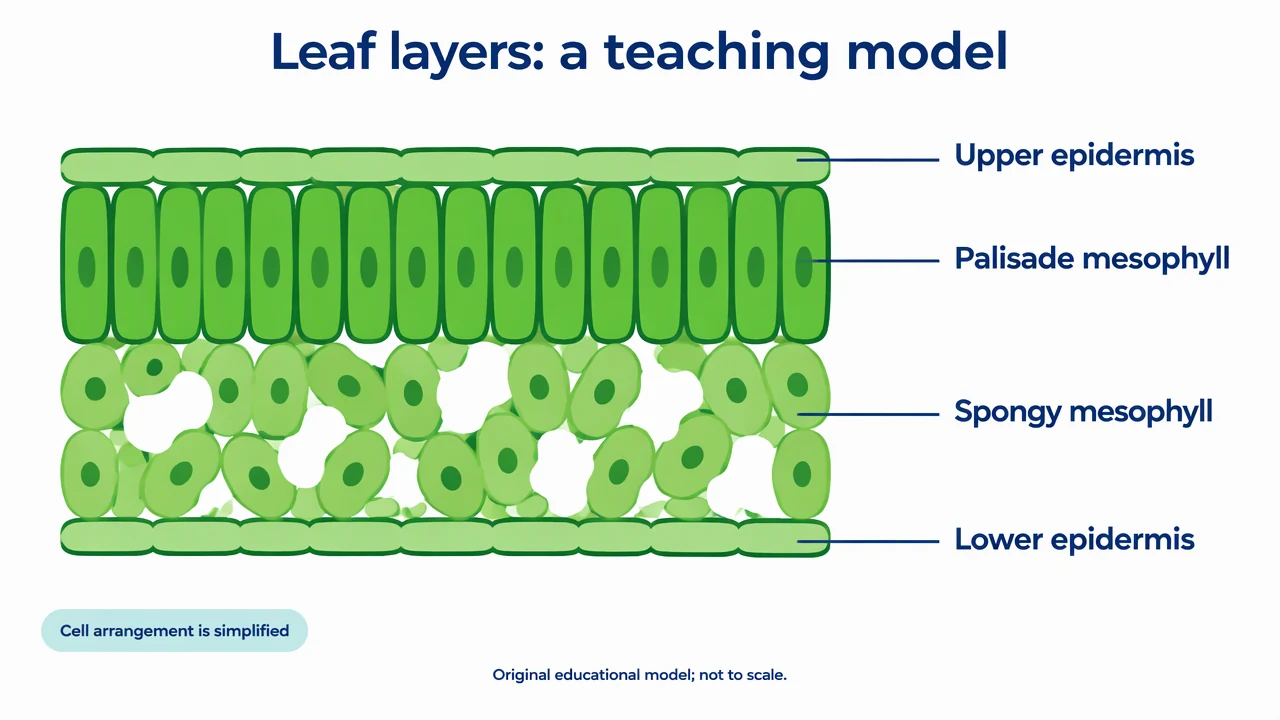
Leaf layers: a simplified teaching model
An original cross-section organizes the upper epidermis, palisade mesophyll, spongy mesophyll and lower epidermis into a readable layered model. It simplifies real variation for one lesson.
Textbook Illustration Maker: reference key
Use the reference and definitions together. On a small screen, scroll the table horizontally.
| Element | Meaning | Review check |
|---|---|---|
| Learning objective | The question the learner should answer | Choose the minimum structures needed for that goal. |
| Viewpoint | The orientation or section shown | Name the section and keep orientation consistent. |
| Label | A term attached to the relevant structure | End leaders at the feature rather than an empty region. |
| Hierarchy | The order in which elements attract attention | Make key structures more prominent than decoration. |
| Simplification | A deliberate omission or abstraction | Explain where the model does not represent every real example. |
| Description | A text account of the visual meaning | Provide the relationships needed to learn without image-only access. |
Textbook Illustration Maker: plan the visual
Use the textbook illustration maker to create original teaching visuals for a defined learning objective. Choose the essential structures, label them clearly and review the illustration against reliable subject references.
Start with what the learner must notice
A lesson about leaf layers needs a different figure from a lesson about gas exchange or transport. Tell the textbook illustration maker the learning objective before asking for visual richness. Include structures that serve that objective and omit details that compete with it.
Make labels and orientation work together
Name the section, establish top and bottom, and attach leaders to the correct layer. Use source terminology consistently across the figure and surrounding text. A tidy label arrangement is not enough if the leaders point at the wrong feature.
Treat simplification as an editorial choice
Teaching figures can compress depth, use false color and omit variation. State the scope rather than implying the picture is a universal specimen. Review the generated model with a subject reference and include a useful description of its relationships.
Common mistakes to avoid
Reusing textbook artwork without checking rights
Create an original figure and use references to verify concepts rather than copying a published composition.
Adding too many labels at once
A crowded introductory figure can undermine the learning objective. Move advanced detail into a separate panel or later lesson.
Trusting attractive labels automatically
Check spelling, feature placement and biological variation. Generated artwork still needs subject review.
Textbook Illustration Maker: from brief to draft
Reading the reference is free. Generating a new draft requires an account and available credits. See current pricing.
Choose Science Drawing for an illustrated draft, or Editable Diagram for separate shapes and labels. Review all definitions, labels and connections before sharing.
- 1
Define the lesson
Write the audience, learning objective, viewpoint and essential terms.
- 2
Draft the teaching visual
Use the textbook illustration maker with explicit structures and label instructions.
- 3
Review and describe
Check the subject content, simplify distractions and add a meaningful text description.
Example brief for the textbook illustration maker
Original educational illustration on white, 1280x720 landscape, crisp vector-like editorial style, navy readable English labels, teal and amber accents, generous whitespace. Render all shapes, labels and arrows directly in the image. No third-party artwork, brand, logo, screenshot or measured result. Title 'Leaf layers: a teaching model'. A clean simplified transverse section of a typical broad leaf. Four horizontal layers: thin 'Upper epidermis', vertical tightly packed cells 'Palisade mesophyll', loosely packed cells with air spaces 'Spongy mesophyll', thin 'Lower epidermis'. Labels on the right with straight leader lines ending in the correct layer, no arrowheads. Small legend 'Cell arrangement is simplified'. Footer 'Original educational model; not to scale'. Do not use copied textbook artwork, photo, vascular bundle claims or universal species claims.
Use this prompt in the generatorTextbook Illustration Maker: common questions
What does the textbook illustration maker create?
It drafts original labeled teaching visuals from your learning objective and subject description.
Can I use a published textbook as a reference?
Use reliable references to check concepts and terminology, but do not copy protected artwork or upload material without the necessary rights.
Does the tool guarantee scientific accuracy?
No. Review generated structures, labels and relationships against appropriate subject references before use.
Can I make a simpler version for younger learners?
Yes. Specify the audience and essential terms, then inspect what was omitted and whether the main concept remains correct.
Sources and editorial notes
Prepared by the AcaDraw product team. Source and diagram check: . This is a simplified educational model; independent expert review has not been completed. AI-generated drafts need checking against reliable references.
Explore the textbook illustration guide
An original cross-section organizes the upper epidermis, palisade mesophyll, spongy mesophyll and lower epidermis into a readable layered model. It simplifies real variation for one lesson.
Textbook Illustrations: Learning Goals, Labels, and Visual Hierarchy