Syntactic Tree Generator
Use a syntactic tree generator to visualize how words combine into phrases and clauses. Keep the hierarchy explicit, use consistent category labels and review the parse against the grammar framework you teach.
SEE ACADRAW IN ACTION
Science drawing, from idea to editable figure
Create a science illustration with AI. Refine drawings, build editable diagrams, and convert images to SVG.
Demos play as you scroll into view. Choose a feature to explore.
Trusted by students & researchers from 480+ universities
A global community spanning 60+ countries and regions, from QS top-ranked universities to leading research institutes
























University logos belong to their respective institutions and are shown solely to illustrate our user community. They do not imply any partnership or endorsement.
Tool overview
Explore the use cases, workflow, and key things to know.
Define the scope
Choose the view, audience and labels before generating.
Keep relationships explicit
Use readable connectors, boundaries or arrows instead of decorative ambiguity.
Review before sharing
Check spelling, endpoints and claims against reliable references.
Concept reference
Syntactic tree reference: constituents and phrase structure
The top node represents the sentence, which branches into noun and verb phrases before reaching word-level leaves. Category labels such as NP and VP are framework-dependent and should be defined for the audience.
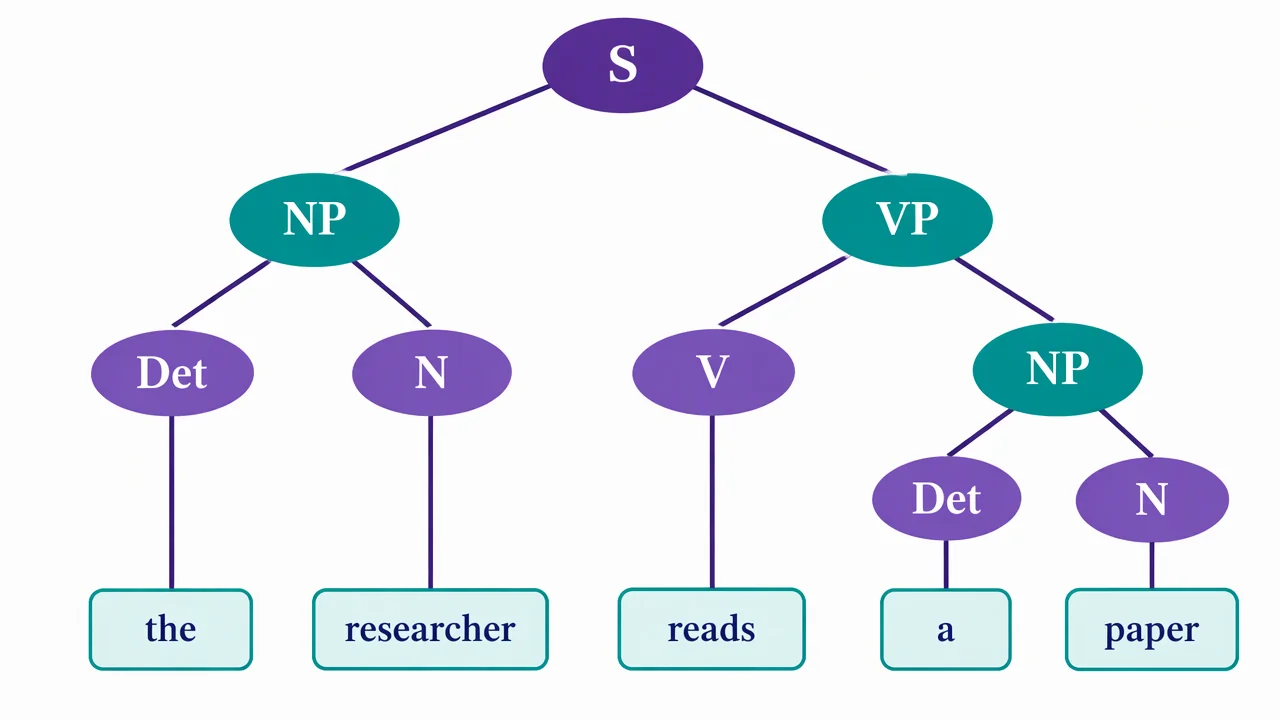
Syntactic tree label key
Use the reference and definitions together. On a small screen, scroll the table horizontally.
| Label | Role in the tree | Check |
|---|---|---|
| S | Sentence or clause node. | Confirm whether the framework uses S, TP or another clause label. |
| NP | Noun phrase constituent. | Keep the determiner and noun under the intended phrase. |
| VP | Verb phrase constituent. | Attach the verb and its complements consistently. |
| Terminal | Word at a leaf. | Preserve the sentence order and exact spelling. |
Build the hierarchy from constituents
Start with the full sentence node, divide it into major phrases, then continue until each terminal word has a clear parent.
Labels depend on a framework
Traditional grammar and formal syntax may use different category names.
Branches encode constituency
A branch should show which words form a unit in the chosen analysis.
Word order still matters
A readable tree preserves the original sentence order at the leaves.
Common syntactic tree mistakes
Mixing frameworks
Do not combine category labels from incompatible analyses without explanation.
Crossing branches
Rephrase or widen the canvas so the tree remains readable.
Dropping function words
Include determiners, auxiliaries and conjunctions when they are part of the target analysis.
Create your own syntactic tree diagram
Reading the reference is free. Generating a new draft requires an account and available credits. See current pricing.
Choose Science Drawing for an illustrated draft, or Editable Diagram for separate shapes and labels. Review all definitions, labels and connections before sharing.
- 1
Choose the grammar framework
Define the category labels and sentence type.
- 2
Split the constituents
Branch from the sentence to phrases, then to words.
- 3
Review the parse
Check every terminal, parent relation and label against the chosen framework.
A prompt you can adapt
Create a clean syntactic tree for “The researcher reads a paper.” Use S at the root, NP and VP branches, Det and N categories, readable terminal words and noncrossing connectors. Add a note that labels follow an introductory phrase-structure convention.
Use this prompt in the generatorSyntactic Tree diagram FAQ
What is a syntactic tree?
It is a hierarchical diagram showing how words group into phrases and clauses.
What does NP mean?
NP commonly means noun phrase, though a framework may use a different label.
Why do syntax trees have branches?
Branches show constituent relationships and the levels of the grammatical hierarchy.
Can I use a different grammar framework?
Yes. State the framework and adapt the category labels consistently.
Can I turn it into a worksheet?
Yes. Keep the completed tree as an answer key and remove selected labels from a copy.
Sources and editorial notes
Prepared by the AcaDraw product team. Source and diagram check: . This is a simplified educational model; independent expert review has not been completed. AI-generated drafts need checking against reliable references.
Create a syntactic tree diagram for your lesson
Choose the scope, generate a draft, then review labels and connections before sharing.
Syntactic Tree Generator: Show Constituents and Phrase Structure