Sentence Diagram Generator
Use a sentence diagram generator to map how words function in a sentence. Keep the subject, verb, object and modifiers distinct, then check that each line represents the intended grammatical relationship.
SEE ACADRAW IN ACTION
Science drawing, from idea to editable figure
Create a science illustration with AI. Refine drawings, build editable diagrams, and convert images to SVG.
Demos play as you scroll into view. Choose a feature to explore.
Trusted by students & researchers from 480+ universities
A global community spanning 60+ countries and regions, from QS top-ranked universities to leading research institutes
























University logos belong to their respective institutions and are shown solely to illustrate our user community. They do not imply any partnership or endorsement.
Tool overview
Explore the use cases, workflow, and key things to know.
Define the scope
Choose the view, audience and labels before generating.
Keep relationships explicit
Use readable connectors, boundaries or arrows instead of decorative ambiguity.
Review before sharing
Check spelling, endpoints and claims against reliable references.
Concept reference
Sentence diagram reference: subjects, verbs, objects and modifiers
The diagram uses a baseline for the core clause and slanted or vertical branches for modifiers and phrases. It is a teaching model for one sentence, not a universal analysis of every grammar tradition.
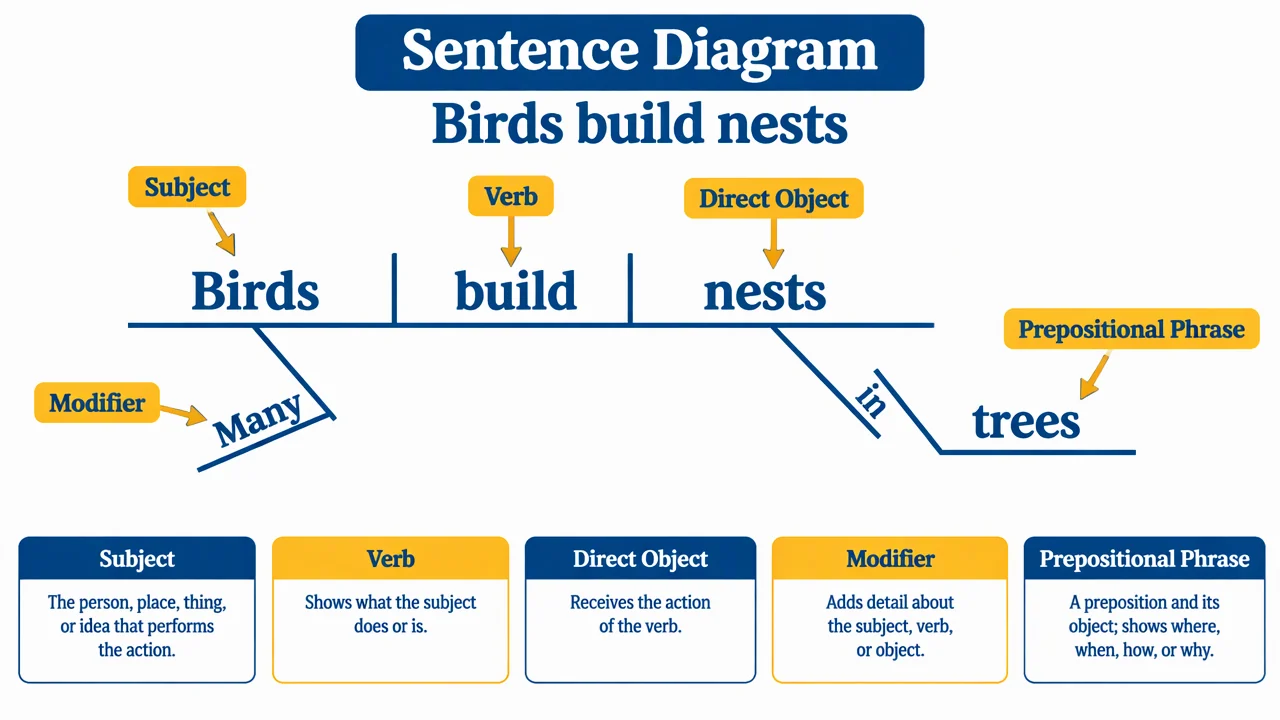
Sentence diagram label key
Use the reference and definitions together. On a small screen, scroll the table horizontally.
| Part | Where it appears | Question it answers |
|---|---|---|
| Subject | Main left side of the baseline. | Who or what performs or experiences the action? |
| Verb or predicate | Main right side of the baseline. | What action or state is being expressed? |
| Direct object | After a transitive verb. | What receives the action? |
| Modifier or phrase | On a branch below the core. | Which word or clause does the extra information describe? |
Read the sentence from its core clause outward
Find the subject and predicate first. Add objects, complements and modifiers only after the main clause is clear.
Diagram conventions vary
Different classrooms use slightly different line styles; define the convention before grading.
Function is contextual
A word can serve different roles in different sentences.
Keep the example complete
Include punctuation and the full sentence so the analysis has enough context.
Common sentence diagram mistakes
Starting with modifiers
Find the core subject and predicate before adding branches.
Confusing words with functions
Label the grammatical role, not just the word itself.
Treating one convention as universal
State which diagramming convention the worksheet follows.
Create your own sentence diagram diagram
Reading the reference is free. Generating a new draft requires an account and available credits. See current pricing.
Choose Science Drawing for an illustrated draft, or Editable Diagram for separate shapes and labels. Review all definitions, labels and connections before sharing.
- 1
Choose the sentence
Use a complete sentence that matches the learning goal.
- 2
Map the core
Place the subject and predicate on the main baseline.
- 3
Add relationships
Attach objects, modifiers and phrases to the word they modify.
A prompt you can adapt
Create a clean sentence diagram for “Birds build nests.” Show the subject, verb, direct object, modifier and prepositional phrase with readable labels, a horizontal baseline and noncrossing branches. Keep the example qualitative and classroom-ready.
Use this prompt in the generatorSentence Diagram diagram FAQ
What is a sentence diagram?
It is a visual representation of the grammatical relationships among words in a sentence.
Does every grammar class use the same lines?
No. Conventions vary, so define the notation used in the lesson.
Can I diagram a compound sentence?
Yes. Add coordinated clauses and label the conjunction or relationship clearly.
Can I create a blank grammar worksheet?
Yes. Keep a labeled answer key and remove the labels from a duplicate.
Does the diagram replace a grammar explanation?
No. It supports an explanation by making the relationships visible.
Sources and editorial notes
Prepared by the AcaDraw product team. Source and diagram check: . This is a simplified educational model; independent expert review has not been completed. AI-generated drafts need checking against reliable references.
Create a sentence diagram diagram for your lesson
Choose the scope, generate a draft, then review labels and connections before sharing.
Sentence Diagram Generator: Map Subjects, Clauses, and Modifiers