Factor Tree Generator
Use a factor tree generator to break a whole number into prime factors. Each composite node splits into two factors whose product equals the parent, and the branches stop at prime numbers. Check the arithmetic independently before using a generated worksheet.
SEE ACADRAW IN ACTION
Science drawing, from idea to editable figure
Create a science illustration with AI. Refine drawings, build editable diagrams, and convert images to SVG.
Demos play as you scroll into view. Choose a feature to explore.
Trusted by students & researchers from 480+ universities
A global community spanning 60+ countries and regions, from QS top-ranked universities to leading research institutes























University logos belong to their respective institutions and are shown solely to illustrate our user community. They do not imply any partnership or endorsement.
Tool overview
Explore the use cases, workflow, and key things to know.
Different trees can agree
Splitting 60 as 6 × 10 or 4 × 15 gives the same multiset of prime leaves, in a different arrangement.
Keep multiplicity
Two leaves labeled 2 mean two factors of 2. Do not remove one as a duplicate.
Check before exporting
AI can draw a convincing tree with an incorrect product. Verify every split and the complete prime factorization.
Concept reference
Factor Tree: a worked example
The example splits 60 into 6 and 10, then splits those into 2 × 3 and 2 × 5. The leaves are 2, 3, 2 and 5. Their product is 60, and the repeated factor 2 gives the exponential form 2² × 3 × 5.
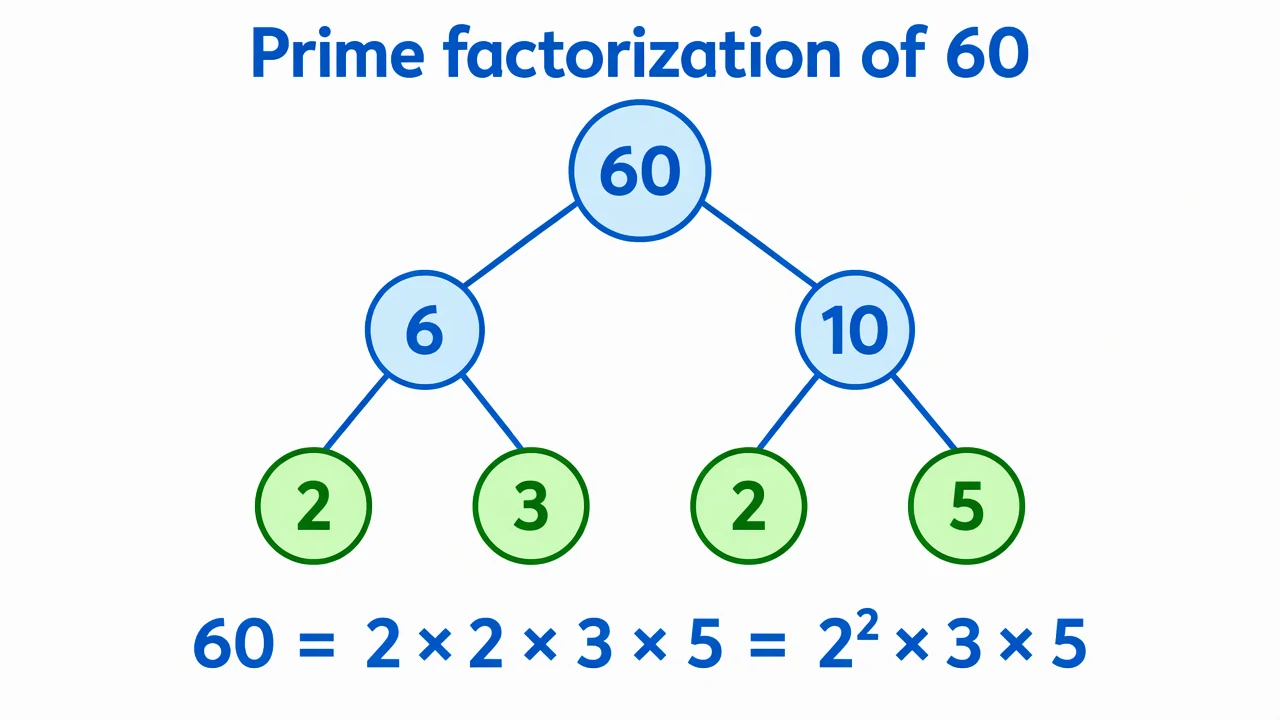
Factor Tree reference key
Use the reference and definitions together. On a small screen, scroll the table horizontally.
| Element | Meaning | Review check |
|---|---|---|
| Root | A composite positive integer | Use a number greater than one and identify whether it is already prime. |
| Factor pair | Two integers multiplying to the parent | For example, 6 × 10 = 60. Addition is not the tree rule. |
| Composite node | A number with a further nontrivial factor pair | Continue splitting 6 into 2 and 3. |
| Prime leaf | A prime number at a branch end | Stop at primes; 1 is not a prime factor. |
| Final product | All prime leaves multiplied together | Include repeated factors and verify the product equals the root. |
Plan your factor tree
A correct factor tree preserves multiplication at every split, even when different first splits produce different shapes.
Different trees can agree
Splitting 60 as 6 × 10 or 4 × 15 gives the same multiset of prime leaves, in a different arrangement.
Keep multiplicity
Two leaves labeled 2 mean two factors of 2. Do not remove one as a duplicate.
Check before exporting
AI can draw a convincing tree with an incorrect product. Verify every split and the complete prime factorization.
Common mistakes to avoid
Addition used at a split
The parent equals the product of its two child factors, not their sum.
A composite leaf left unfinished
A leaf such as 6 needs to split further in a prime-factor tree.
One treated as prime
One is neither prime nor composite; it is not a prime-factor leaf.
Factor Tree Generator: from brief to checked draft
Reading the reference is free. Generating a new draft requires an account and available credits. See current pricing.
Choose Science Drawing for an illustrated draft, or Editable Diagram for separate shapes and labels. Review all definitions, labels and connections before sharing.
- 1
Choose the root number
Start with a positive composite integer.
- 2
Draft the factor pairs
Split each composite node into two factors.
- 3
Verify the leaves
Check that all leaves are prime and their product equals the root.
A prompt you can adapt
Create an editable factor tree for 60. Split 60 into 6 and 10, split 6 into 2 and 3, split 10 into 2 and 5. Highlight prime leaves and show 60 = 2 × 2 × 3 × 5 = 2² × 3 × 5. Do not omit repeated prime factors.
Use this prompt in the generatorFactor Tree FAQ
What is a factor tree?
It repeatedly splits composite numbers into factor pairs until all leaves are prime.
Can I start with a different factor pair?
Yes. Valid choices give the same prime factorization, apart from factor order.
Is one a prime factor?
No. One is not prime and is not included among the prime leaves.
Does the generator guarantee arithmetic accuracy?
No. Review generated text and branches and verify the multiplication independently.
Sources and editorial notes
Prepared by the AcaDraw product team. Source and diagram check: . This is a simplified educational model; independent expert review has not been completed. AI-generated drafts need checking against reliable references.
Explore the factor tree guide
A correct factor tree preserves multiplication at every split, even when different first splits produce different shapes.
Factor Tree: Split Composite Numbers and Check the Product