Swimlane Diagram Maker
Use the swimlane diagram maker to assign process steps to people, teams or systems. Make handoffs, decisions and completion conditions visible without confusing ownership with execution time.
SEE ACADRAW IN ACTION
Science drawing, from idea to editable figure
Create a science illustration with AI. Refine drawings, build editable diagrams, and convert images to SVG.
Demos play as you scroll into view. Choose a feature to explore.
Trusted by students & researchers from 480+ universities
A global community spanning 60+ countries and regions, from QS top-ranked universities to leading research institutes























University logos belong to their respective institutions and are shown solely to illustrate our user community. They do not imply any partnership or endorsement.
Tool overview
Explore the use cases, workflow, and key things to know.
Visible ownership
Assign each action to an explicit role or system.
Clear handoffs
Name the work crossing each responsibility boundary.
Review loops
Show both completion and revision outcomes.
Concept reference
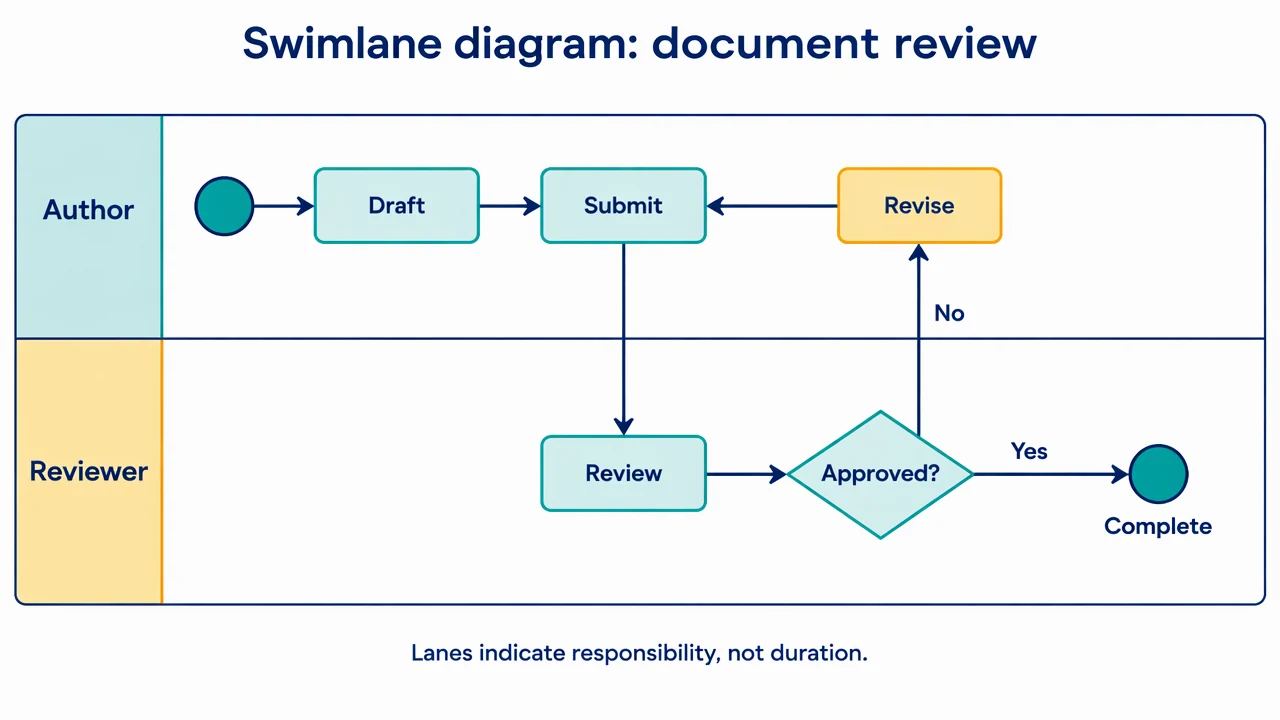
Swimlane diagram: a review handoff
Two horizontal lanes assign drafting to an author and review to a reviewer. A decision either returns the work for revision or leads to completion.
Swimlane Diagram Maker: reference key
Use the reference and definitions together. On a small screen, scroll the table horizontally.
| Element | Meaning | Review check |
|---|---|---|
| Lane | A partition for a role, team or system | Define one consistent ownership rule. |
| Activity | Work performed by the lane owner | Use an action phrase and one primary owner. |
| Handoff | A flow crossing a lane boundary | State what is passed and the next responsibility. |
| Decision | A branch selected by a condition | Label the outgoing conditions. |
| Return loop | A path leading back to earlier work | Make the revision or retry trigger clear. |
| Completion | The agreed process end | Distinguish completion from simply sending a request. |
Swimlane Diagram Maker: plan the visual
Use the swimlane diagram maker to assign process steps to people, teams or systems. Make handoffs, decisions and completion conditions visible without confusing ownership with execution time.
Choose lane owners rather than departments by default
A process may depend on roles or systems more than organizational teams. Tell the swimlane diagram maker what membership means. Avoid placing an action in two lanes when one owns it and the other is only consulted.
Label the handoff artifact
A submitted draft, review comment and approved release are different things. Name the transfer when ambiguity matters. Crossing a lane boundary should reveal a responsibility change instead of merely moving a connector around the page.
Give decisions an owner and an exit
Place the decision where the responsible role evaluates the condition. Label both outcomes and show where a revision returns. A loop without a completion condition can hide a process problem even in a visually neat diagram.
Common mistakes to avoid
Using lanes as calendar periods
Lanes normally represent responsibility; process order follows connectors. A schedule needs an explicitly different convention.
Hiding shared work in a vague task
If review and revision have different owners, split them into separate actions and show the handoff.
Leaving decisions with one unlabeled branch
State the conditions and trace both outcomes, including a return or rejection path.
Swimlane Diagram Maker: from brief to draft
Reading the reference is free. Generating a new draft requires an account and available credits. See current pricing.
Choose Science Drawing for an illustrated draft, or Editable Diagram for separate shapes and labels. Review all definitions, labels and connections before sharing.
- 1
List roles and actions
Identify the owner, input and completion condition for each step.
- 2
Arrange lanes and handoffs
Use the swimlane diagram maker with explicit decision conditions and return paths.
- 3
Check ownership end to end
Walk through the workflow and confirm who holds the work at each point.
Example brief for the swimlane diagram maker
Original educational illustration on white, 1280x720 landscape, crisp vector-like editorial style, navy readable English labels, teal and amber accents, generous whitespace. Render all shapes, labels and arrows directly in the image. No third-party artwork, brand, logo, screenshot or measured result. Title 'Swimlane diagram: document review'. Two horizontal lanes 'Author' on top and 'Reviewer' below. Top left start circle -> 'Draft' -> 'Submit'. Arrow down from Submit to 'Review' in Reviewer lane -> diamond 'Approved?'. Branch labeled 'Yes' goes right to end circle labeled 'Complete' in Reviewer lane. Branch labeled 'No' routes back to 'Revise' in Author lane, then Revise arrow goes to Submit. Clear lane boundaries, no overlapping paths. Footer 'Lanes indicate responsibility, not duration'.
Use this prompt in the generatorSwimlane Diagram Maker: common questions
What does the swimlane diagram maker create?
It drafts a workflow partitioned by responsible roles, teams or systems from a written process description.
Is a swimlane diagram always BPMN?
No. Lanes can appear in several notations. State whether you need a simple flowchart, UML activity view or a specific notation.
Can one lane contain several steps?
Yes. Group the actions owned by that role and show their sequence and handoffs clearly.
Does the tool assign real tasks?
No. It creates a visual draft rather than managing work or notifying participants.
Sources and editorial notes
Prepared by the AcaDraw product team. Source and diagram check: . This is a simplified educational model; independent expert review has not been completed. AI-generated drafts need checking against reliable references.
Explore the swimlane diagram guide
Two horizontal lanes assign drafting to an author and review to a reviewer. A decision either returns the work for revision or leads to completion.
Swimlane Diagrams: Ownership, Handoffs, and Decisions