Ladder Diagram Generator
Use the ladder diagram generator to illustrate contacts, branches, coils and a simple seal-in rung. Specify Boolean conditions and PLC conventions, then review the drawing before using a platform-specific programming tool.
SEE ACADRAW IN ACTION
Science drawing, from idea to editable figure
Create a science illustration with AI. Refine drawings, build editable diagrams, and convert images to SVG.
Demos play as you scroll into view. Choose a feature to explore.
Trusted by students & researchers from 480+ universities
A global community spanning 60+ countries and regions, from QS top-ranked universities to leading research institutes
























University logos belong to their respective institutions and are shown solely to illustrate our user community. They do not imply any partnership or endorsement.
Tool overview
Explore the use cases, workflow, and key things to know.
State the Boolean behavior
Define input meanings, output state, initial conditions and expected reset behavior.
Draft the rung
Use the ladder diagram generator with explicit series/parallel connections and tag names.
Validate in the target platform
Review instruction semantics, scan behavior and tests in vendor software before implementation.
Concept reference
Ladder logic: a conceptual seal-in rung
The example uses a Stop_OK logical contact in series with parallel Start and Run contacts, driving a Run coil. It describes a Boolean condition rather than a tested wiring design.
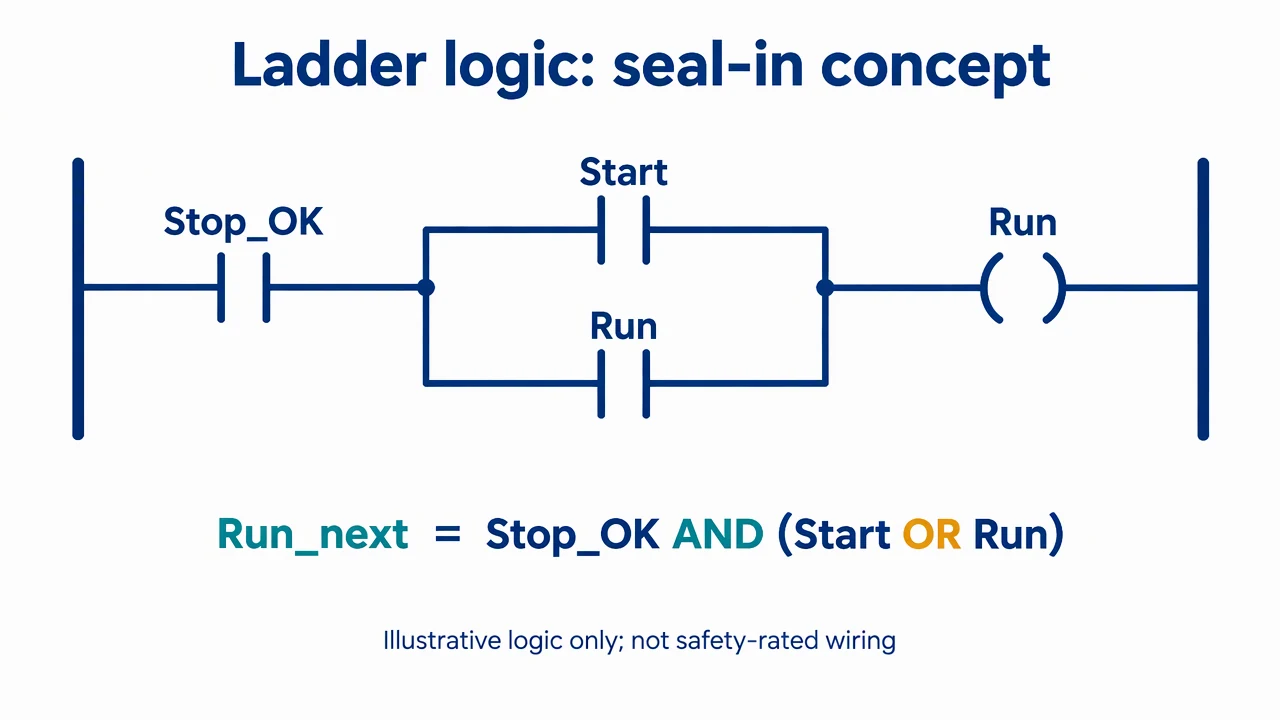
Ladder Diagram Generator: reference key
Use the reference and definitions together. On a small screen, scroll the table horizontally.
| Element | Meaning | Review check |
|---|---|---|
| Rung | A logical expression arranged between rails | Identify the conditions that make it true. |
| Logical contact | An instruction testing a Boolean state | Do not equate the symbol directly with physical switch wiring. |
| Series contacts | Conditions combined with AND | All tested conditions must be true. |
| Parallel branches | Alternative paths combined with OR | Check where the branch starts and rejoins. |
| Coil | An instruction assigning an output state | Review multiple assignments and platform semantics. |
| Scan behavior | The execution and update model of the PLC | Check instruction order, startup and I/O update rules. |
Ladder Diagram Generator: plan the visual
Use the ladder diagram generator to illustrate contacts, branches, coils and a simple seal-in rung. Specify Boolean conditions and PLC conventions, then review the drawing before using a platform-specific programming tool.
Describe logic before drawing symbols
Write the intended Boolean behavior in words. In the example, Stop_OK must be true and either Start or the existing Run state must be true. Use the ladder diagram generator to illustrate that expression, then inspect the exact branch topology.
Distinguish contact instructions from wiring
A logical contact tests a value in the program. A physical normally closed stop circuit can produce a true Stop_OK bit when healthy. Keep electrical wiring, input polarity and instruction behavior separate so the drawing does not invert the intended stop condition.
Review scan and startup assumptions
A seal-in example is incomplete without knowing initialization, I/O updates and what happens after a power cycle. A diagram can explain the concept but cannot validate a PLC program. Use the target vendor tools and an appropriate test environment for executable logic.
Common mistakes to avoid
Treating a logical contact as a wire
The same visual convention may be read differently in programming and electrical schematics. Label the instruction and the meaning of its Boolean input.
Leaving the branch endpoints ambiguous
A parallel Run contact must bypass Start only, not the stop condition. Check both junctions carefully.
Using a teaching rung as a safety circuit
Standard control logic is not a safety-rated emergency-stop design. Hardware architecture and safety validation require the applicable process.
Ladder Diagram Generator: from brief to draft
Reading the reference is free. Generating a new draft requires an account and available credits. See current pricing.
Choose Science Drawing for an illustrated draft, or Editable Diagram for separate shapes and labels. Review all definitions, labels and connections before sharing.
- 1
State the Boolean behavior
Define input meanings, output state, initial conditions and expected reset behavior.
- 2
Draft the rung
Use the ladder diagram generator with explicit series/parallel connections and tag names.
- 3
Validate in the target platform
Review instruction semantics, scan behavior and tests in vendor software before implementation.
Example brief for the ladder diagram generator
Original educational scientific illustration on white, 1280x720 landscape. Crisp vector-like editorial artwork, navy text, teal and amber accents, generous whitespace, large legible English labels. All structures, labels and connecting arrows rendered by the image model. No third-party artwork, logo, photograph, experimental measurement or numerical performance claim. Title 'Ladder logic: seal-in concept'. Draw two vertical rails, one rung. From left rail through one normally-open logical contact labeled 'Stop_OK'; then split into parallel branches: top normally-open contact labeled 'Start', bottom normally-open contact labeled 'Run'; branches rejoin and continue to one output coil labeled 'Run' before right rail. Standard NO contact symbol two vertical short bars; output coil parentheses. No crossed NC contact. Small equation below 'Run_next = Stop_OK AND (Start OR Run)'. Footer 'Illustrative logic only; not safety-rated wiring'. Exact rung topology, no extra coils or hardware schematic.
Use this prompt in the generatorLadder Diagram Generator: common questions
What does the ladder diagram generator create?
It drafts a conceptual PLC ladder visual from described Boolean conditions, including contacts, branches and coils.
Will it generate a runnable PLC project?
No. It does not create or validate a vendor-specific program or controller configuration.
Does a normally open instruction mean a physical normally open switch?
Not necessarily. The instruction tests a program value; physical wiring and input polarity must be documented separately.
Can I use the example as an emergency-stop design?
No. The seal-in rung is a teaching example and does not provide a safety-rated architecture.
Sources and editorial notes
Prepared by the AcaDraw product team. Source and diagram check: . This is a simplified educational model; independent expert review has not been completed. AI-generated drafts need checking against reliable references.
Explore the ladder diagram guide
The example uses a Stop_OK logical contact in series with parallel Start and Run contacts, driving a Run coil. It describes a Boolean condition rather than a tested wiring design.
Ladder Diagrams: Contacts, Coils, and Scan Logic