Research and learning tools
Poster Size Calculator
Calculate the raster pixel dimensions for a poster from its physical width, height and intended pixels per inch. Choose a common size or enter a custom size, then check your image dimensions against the printer or conference requirements.
Poster dimensions calculator
Free local calculation · no account or credits
Required raster dimensions
3,508 × 4,967 pixels
Physical size: 594 × 841 mm
Rounded up to whole pixels. PPI describes image pixels per inch; printer DPI is different. Changing resolution metadata does not create more detail.
Confirm size, bleed, margins and accepted file format with your venue or print provider.
SEE ACADRAW IN ACTION
Science drawing, from idea to editable figure
Create a science illustration with AI. Refine drawings, build editable diagrams, and convert images to SVG.
Demos play as you scroll into view. Choose a feature to explore.
Trusted by students & researchers from 480+ universities
A global community spanning 60+ countries and regions, from QS top-ranked universities to leading research institutes























University logos belong to their respective institutions and are shown solely to illustrate our user community. They do not imply any partnership or endorsement.
Tool overview
Explore the use cases, workflow, and key things to know.
Units change the input
One inch is exactly 25.4 millimeters. A1 is 594 × 841 mm and A0 is 841 × 1189 mm.
PPI describes raster density
The selected PPI controls how many pixels are needed at final size; it does not guarantee sharp source artwork.
Printer DPI is different
Printer dot placement and image pixels are related concepts but not interchangeable specifications. Follow the printer’s requested file preparation.
Concept reference
Poster Size Calculator: a worked example
The size reference compares A1 and A0 dimensions and states the conversion from inches to pixels. Paper measurements follow ISO A-series sizes. The illustration is a reference; the calculator performs the actual conversion from your inputs.
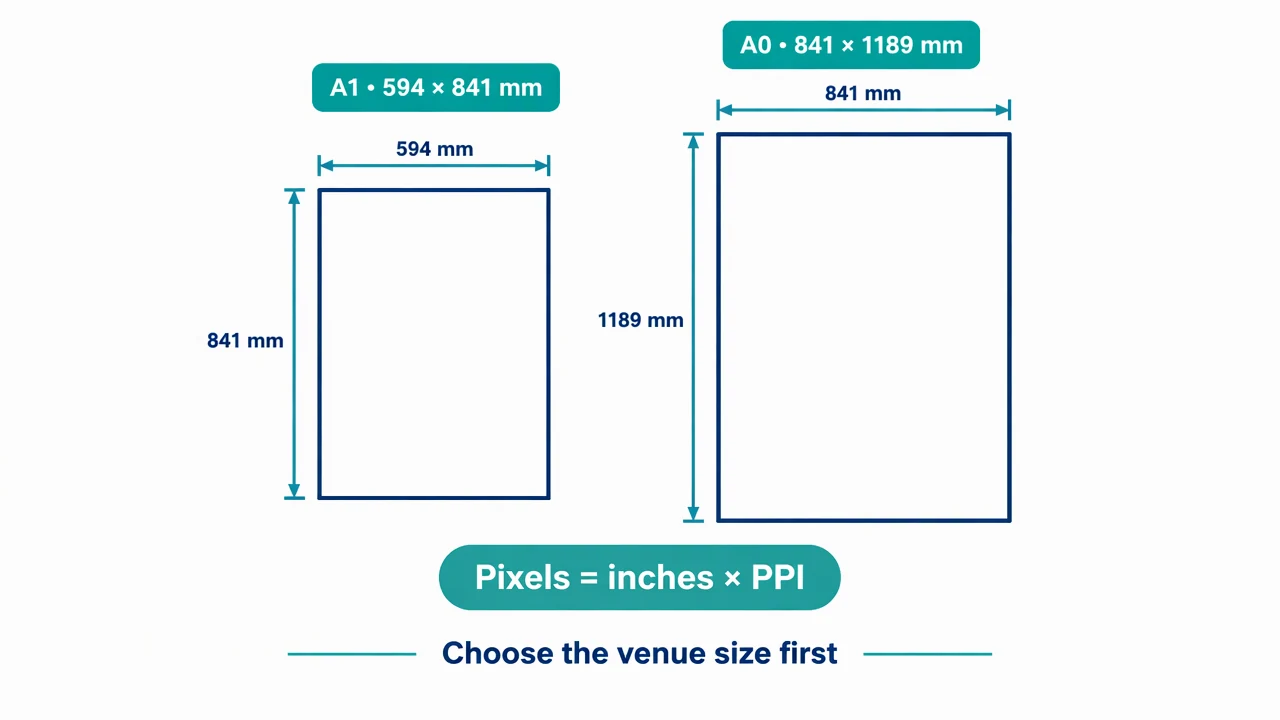
Poster Size Calculator reference key
Use the reference and definitions together. On a small screen, scroll the table horizontally.
| Element | Meaning | Review check |
|---|---|---|
| Width and height | Final physical dimensions | Choose the venue size and orientation before checking pixels. |
| Inches | Physical unit used by PPI | Convert millimeters to inches by dividing by 25.4. |
| PPI | Pixels per inch at final size | Ask the printer which target is suitable for the viewing distance and artwork. |
| Pixel dimensions | Width in inches × PPI and height in inches × PPI | Round up to whole pixels to meet the requested minimum. |
| Print size | Pixels divided by PPI | Changing resolution metadata alone does not add detail to an image. |
Plan your poster size calculator
Choose the required physical dimensions first; a resolution setting alone does not determine print size.
Units change the input
One inch is exactly 25.4 millimeters. A1 is 594 × 841 mm and A0 is 841 × 1189 mm.
PPI describes raster density
The selected PPI controls how many pixels are needed at final size; it does not guarantee sharp source artwork.
Printer DPI is different
Printer dot placement and image pixels are related concepts but not interchangeable specifications. Follow the printer’s requested file preparation.
Common mistakes to avoid
Metadata used as upscaling
Changing a PPI tag without adding pixels cannot recover detail.
Blank or zero dimensions
Use positive finite dimensions and a sensible positive resolution.
Aspect ratio ignored
Stretching a source image to a different poster ratio can distort the content.
Choose a size, convert it, check the print brief
The calculator runs in your browser without an account or credits. Choose a venue-approved size, enter a PPI target and use the pixel dimensions when preparing raster artwork.
This calculates dimensions only. It does not upscale an image, change its resolution or export a print-ready PDF. Poster generation is a separate account-based tool.
- 1
Confirm the venue size
Check physical dimensions, orientation and margins.
- 2
Calculate the target
Select units and PPI to calculate the raster pixel dimensions.
- 3
Inspect the source
Compare actual pixel dimensions, readability and print guidelines before export.
Planning a poster after calculating its size
Draft a scientific poster planning brief with final width, height, units, orientation, target image PPI, expected pixel dimensions, margins and a checklist for verified figures. Do not invent research data or promise print readiness.
Return to the calculatorPoster Size Calculator FAQ
How do I convert poster inches to pixels?
Multiply each dimension in inches by the target PPI. This calculator rounds up to whole pixels.
Is A0 twice the width of A1?
No. A0 is 841 × 1189 mm and A1 is 594 × 841 mm; their areas differ by about a factor of two.
Does choosing 300 PPI improve a small source image?
No. It calculates the target dimensions. Existing artwork needs enough real detail at that size.
Is this calculator free?
The local size conversion works without an account or credits. Generating a poster concept is a separate account-and-credit workflow.
Sources and editorial notes
Prepared by the AcaDraw product team. Source and diagram check: . This is a simplified educational model; independent expert review has not been completed. AI-generated drafts need checking against reliable references.
Prepare your poster for print
Choose the required physical dimensions first; a resolution setting alone does not determine print size.
Poster Size: Convert Inches, Millimeters, and Pixels at a Chosen PPI